


.png)
.svg)
.jpg)
Regression testing is notoriously repetitive and often becomes a race against the clock. As the sprint closes and the build arrives, testing frequently begins when everyone is already running out of time. Without a clear strategy, teams often test everything "just to be safe," leading to scattered efforts and uncertainty about actual coverage.
To solve this, you need two things: a solid strategy and a tool to execute it. This guide merges strategic planning with a downloadable regression testing template to help you organize your workflow, clarify scope, and track results effectively.
Why You Need a Strategic Regression Test Plan
A regression test plan is the strategic blueprint that ensures the continuity, reliability, and quality of your software as it evolves. For a comprehensive look at how manual regression impacts your budget and release velocity in the modern landscape, read more at: Regression Test Strategy: A 2026 Guide to Planning & Best Practices
Before diving into the spreadsheet, it is vital to understand the threefold goal of your plan:
-
Prevent defect leakage: Even small code changes can break unrelated areas. A good plan catches these bugs before they reach production.
-
Verify bug fixes: You must ensure that fixing one defect hasn't inadvertently caused failures elsewhere in dependent workflows.
-
Maintain product stability: In Agile environments with frequent changes, a regression plan acts as a quality gatekeeper, allowing developers to move fast with confidence.
The Solution: The Regression Testing Starter Kit (Excel)
While a checklist is better than flying blind, it lacks the structure needed for prioritization and traceability. That is why we built the Regression Testing Starter Kit.
This regression testing template excel file is designed to turn scattered efforts into an organized workflow. It serves as a unified framework that helps you move from wondering what to test to executing what matters most.
The kit is organized into specific tabs to manage the lifecycle of your testing:
-
Intent Builder & Suite Picker: For scoping and prioritization.
-
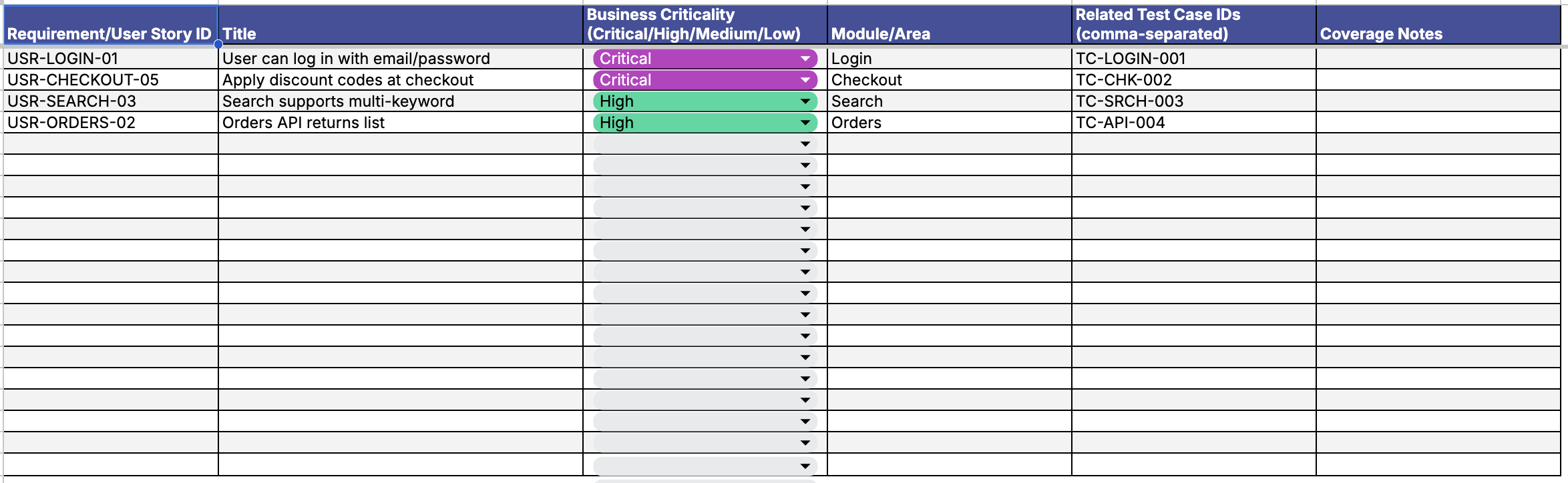
Traceability Matrix: For linking business needs to tests.
-
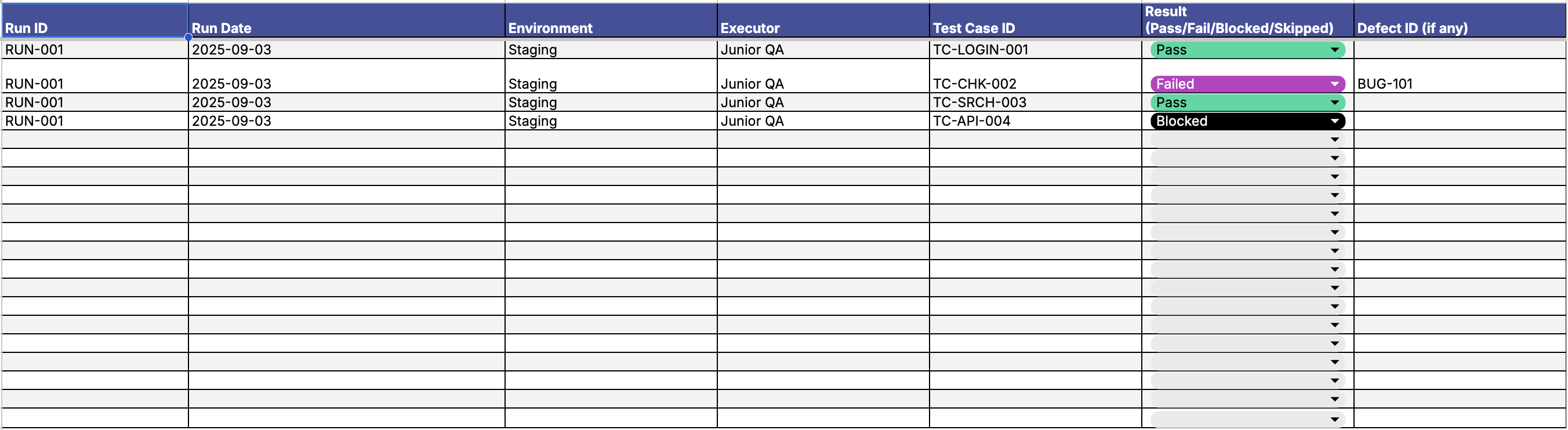
Execution & Defect Logs: For tracking results and bugs.
-
Dashboard: For visualization and reporting.
Step-by-Step: Building Your Plan with the Excel Template


Here is how to combine best practices for planning with the practical application of this regression test plan template in Excel.
Step 1: Define Scope and Prioritize (Intent Builder & Suite Picker)
You cannot test everything all the time. You must identify boundaries so resources are used wisely.
Start with the essentials. Identify core business workflows (like login or checkout), previously failed test cases, and high-risk areas dependent on modified components. You should verify risk based on the probability of change, complexity, and business impact.
Using the Template:
- Open the Intent Builder tab. Define the type of change and assess the risk. The sheet will help auto-weight priorities.
- Move to the Suite Picker. Select the relevant test cases and tag them as P1, P2, or P3 based on the risk analysis. This ensures you always start with the highest risk areas first rather than making arbitrary picks.


Step 2: Establish Traceability and Criteria (Traceability Matrix)
A robust plan requires clear entry and exit criteria. You need to know when to start (e.g., successful smoke tests) and when to stop (e.g., 100% execution of prioritized tests).
Using the Template:
- Use the Traceability Matrix to map your prioritized test cases to specific user stories or requirements.
- This builds a clear line from business need to test results, ensuring that no critical requirement is left unchecked.
Step 3: Execute and Log (Execution & Defect Logs)
Once your plan is set, it is time to schedule and execute. This often happens after code commits or before major releases.
Using the Template:
- Run your tests and update the Execution Log. Mark statuses as Green (Pass), Red (Fail), or Yellow (Blocked).
- If a test fails, switch to the Defect Log. Document the root cause and the test that caught it. This creates a shared understanding of what is broken and helps you track defect leakage.
Step 4: Measure Effectiveness (Dashboard)
Planning does not end at execution. You must track performance metrics to validate the quality of your strategy.
Using the Template:
- The Dashboard tab provides live metrics such as pass rates, automation coverage, and blocker counts.
- Instead of manually building slides for stakeholders, you can share these visuals to show exactly where the release stands.
Critical Prerequisites: Environment and Data
Even the best regression testing template will fail if your environment is unstable or your data is fragile. To ensure your plan works, you must optimize the ecosystem where these tests run.
1. Replicate Production Architecture
Your test environment must closely mirror production in both technology and behavior for reliable results, covering:
- Frontend: Correct browser versions, screen sizes, and responsive views.
- Backend & Middleware: App servers, APIs, message queues (e.g., Kafka), and caching.
- Databases: Matching schemas and realistic seeded test data.
- Third-Party Services: Payment gateways and authentication (mock if needed).
- Infrastructure: Load balancers, firewalls, and CDNs.
💡 Pro Tip: Create an Environment Matrix that lists all components and their required versions, and update it alongside your release plan.
2. Isolate and Version Environments
To avoid test interference, environments must be isolated and versioned. One team’s testing should never pollute another’s data.
Ensure you have a dedicated QA or Pre-Production environment where regression tests can run safely without overlapping with Development or UAT activities.
3. Implement a Modular Data Strategy
Regression suites often span hundreds of cases. Relying on one massive dataset creates fragility; if one test corrupts the data, the rest may fail falsely, a pattern that often gets misdiagnosed as test instability. This overlaps closely with the broader problem of flaky tests in test automation, where data-related non-determinism is one of the hardest root causes to trace. Instead, use modular, composable data snippets that can be combined as needed.
Choose the data strategy that fits your team size and complexity:
- Static Test Data: Pre-defined, version-controlled snapshots. This is ideal for smaller suites as it allows for fast execution, though it requires regular maintenance.
- Dynamic Test Data: Data generated on-the-fly using scripts or APIs. This reduces conflicts in shared environments and offers greater flexibility.
- Hybrid Approach: Use static data for common flows (like login) and dynamic data for complex, stateful scenarios (like unique checkout flows).
From Excel to Automation
While this regression testing template in Excel is an excellent starting point, regression testing is notoriously repetitive, making it an ideal candidate for automation.
As your suite grows, manually updating spreadsheets can become time-consuming. Tools like Katalon allow you to automate these flows. If your team includes manual testers or non-developers who own test cases, Katalon's no code test automation capabilities let them execute those cases directly, without writing a single script. With record-and-playback features, you can capture test objects and simulate real user activity, re-executing them in regression sessions to save time.
A major pain point in regression testing is verifying that changes work across different configurations. Katalon supports running scripts on a wide range of devices, browsers, and environments, allowing QA teams to perform a lot of testing activities in just one place instead of having to spend time configuring environments and constantly switching tools.
Excel tells you that a test failed, Katalon tells you why. After executing tests, Katalon Platform enables teams to review test results with comprehensive and customizable test reports in LOG, HTML, CSV, and PDF formats before forwarding them as email attachments. Furthermore, there is a debugging mode for testers to conduct a root cause analysis for a specific failed case, ensuring that you aren't just finding bugs, but fixing them faster.
Download the Regression Testing Starter Kit
Ready to stop rushing and start planning? The Regression Testing Starter Kit is ready to use out of the box. It helps you clarify scope, pick the right tests, and track results with clean traceability.
Use this kit to bring clarity and speed to your testing cycles, ensuring that every release is stable, reliable, and high-quality.
This regression testing template excel file is designed to turn scattered efforts into an organized workflow. It serves as a unified framework that helps you move from wondering what to test to executing what matters most.
Related templates you might need next
Once you’ve implemented the Regression Testing Starter Kit, there are more tools that can help streamline your QA workflow even further.
These templates are built with the same goal in mind: making manual testing, automation, and test planning faster and easier for everyone on the team.
- QA Test Scenarios Template — Document test flows clearly and quickly. Great for mapping out common user journeys.
- Manual vs Automation Decision Matrix — Helps you choose the right approach for each test case based on stability, frequency, and effort.
- Test Case Management Template — Organize, tag, and track all your test cases in one centralized place.
Each one complements your regression testing strategy. Together, they build a complete system for test planning, execution, and reporting.
Similar Resources
|
