


.svg)


What is Software Testing?
Software testing is how teams verify that an application works as expected before it reaches the people who'll actually use it. The headline question is whether the software does what it's supposed to do, but the answer involves a lot more than ticking off feature requirements.
A proper testing process checks how the software handles pressure, what happens when someone enters input the developer didn't anticipate, whether it stays secure, and how it behaves across the dozens of device and browser combinations real users have. Some of those answers come from running structured test cases. Others come from probing the awkward seams where one part of the system hands off to another.
Most applications carry two categories of defect: the ones engineers already know about and are working through, and the ones nobody's spotted yet because they only show up when users do something the team didn't predict. Testing is how you find the second category before your customers do.
It also isn't something that happens once at the end. The earlier a bug is caught, the cheaper it is to fix. A regression caught during a sprint costs hours; the same regression caught after release can cost weeks of engineering time, lost trust, and in some industries, regulatory exposure. Finance, healthcare, and aviation are the obvious examples, where a missed defect can move from inconvenient to genuinely harmful.
Who does software testing?
QA engineers do most of the structured work, but they're not the only people involved. Developers write and run unit tests against their own code, product managers sign off on acceptance criteria, and in many teams there's a culture of shared ownership that pushes testing across the whole delivery cycle rather than treating it as a final gate before release.
What does software testing actually involve?
The day-to-day work depends on what's being tested. It might mean clicking through a new feature the way a customer would, writing automated scripts that run thousands of variations in minutes, re-running last sprint's test suite to make sure new code hasn't broken something that worked before, or pushing the system hard enough to find out where it gives up.
Whatever the method, the goal is the same: ship something you'd be willing to put your name on.
Benefits of Software Testing
Releasing software without testing it properly is a coin flip. Sometimes nothing bad happens. The rest of the time, you find out about the problem from a customer, which is the worst possible place to find out about it.
Finding bugs before customers do. Modern applications are built from interconnected services, libraries, and third-party APIs, which means a fault in one component rarely stays in one component. It surfaces somewhere else, often in a part of the system that looks unrelated. Catching that in a test environment is the easy case. Catching it after release, with users hitting it in production, is the case that consumes a weekend and ends up on a postmortem.
Stopping quality from drifting. Software ages in odd ways. New features get added, old code gets touched in ways nobody quite remembers, and behaviour that worked six months ago quietly stops working. Regular testing keeps that drift visible. It also surfaces the softer issues, like a page that's become 800ms slower or a workflow that's gained an extra click, that wouldn't trigger any error alerts but make the product worse to use.
Building reliability users come to depend on. Nobody writes a five-star review for software that just works. They notice when it doesn't, especially at the moment they needed it most. Consistent testing is what produces the quiet, boring reliability that good products are built on.
Reducing risk in regulated environments. In sectors like finance, healthcare, and aviation, a software defect isn't a support ticket. It can mean financial loss, harm to patients, or a breach of compliance obligations like HIPAA, PCI DSS, or DO-178C. For organisations operating under that kind of scrutiny, testing is how risk gets managed in a way that's defensible to regulators.
Then there are the edge cases, which are usually the most entertaining part of any QA report. The user who pastes 10,000 characters into a name field. The one running an obscure build of Safari on a phone model nobody on the team owns. The one whose timezone happens to be the exact offset that breaks your date logic. No spec captures every way a real person will interact with software. Testing is how you find those scenarios before they find you.
Types of Software Testing
Testing splits broadly into two camps:
- Functional testing looks at whether features behave the way they're supposed to.
- Non-functional testing looks at everything else: performance, security, usability, scalability, and the other qualities that decide whether the software is genuinely fit for purpose.
Within those two camps there are dozens of specific testing types worth knowing about:
- Unit testing checks an individual unit in isolation from the rest of the application. A unit is the smallest testable part of any software.
- Integration testing checks the interaction between several individual units. These units usually have already passed unit testing.
- End-to-end testing checks the entire end-to-end workflow in the software
- System testing checks the entire system, including its functional and non-functional aspects
- Exploratory testing is where testers explore the software without any predefined goals, trying to find bugs spontaneously.
- Visual testing checks if the software visual aspect satisfies expectations.
- Regression testing checks if new code breaks existing features
- UI testing checks if the User Interface (UI) satisfies expectations.
- Black-box testing is where testers check the software without knowing its code structures
- White-box testing is where testers check the software with full knowing of its code structures.
- Acceptance testing evaluates the application against real-life scenarios.
- Cross-browser testing checks if the software works across browsers and environments.
- Performance testing checks if the software can perform under stress (high user volume/extreme usage).
📚Read more: Different types of software testing you should know
Important Concepts in Software Testing
Test Case
A test case is the basic unit of software testing. It defines a specific condition to test, the steps to follow, the data to use, and the result you expect to see. A well-written test case leaves no room for interpretation: anyone on the team should be able to run it and know immediately whether the software passed or failed.
Good test cases are specific, repeatable, and traceable back to a requirement. A vague test case produces vague results, and vague results don't tell you whether your software is actually ready to ship.
Test Plan
A test plan is the document that governs the entire testing effort. It defines what will be tested, what won't, who is responsible, which tools and environments will be used, and what the timeline looks like.
Think of it as the contract between the testing team and everyone else involved in the release.
Without a test plan, testing becomes reactive. Teams end up testing whatever feels important rather than what actually needs to be covered, and critical gaps only show up after the fact.
Bug/Defect Life Cycle
A bug doesn't just get found and fixed. It travels through a structured process from the moment it's discovered to the moment it's resolved and verified. That process is the defect life cycle.
At each stage, the bug has a status: new, assigned, open, fixed, retested, closed. Tracking that journey matters because it tells you how quickly defects are being resolved, where bottlenecks in your process are, and whether fixes are actually working. A healthy defect life cycle is one of the clearest indicators of a well-run QA team.
Test Environment
The test environment is the combination of hardware, software, network configuration, and data that tests run against. It sounds like infrastructure, but it's actually a testing problem. If your test environment doesn't closely reflect production, your test results don't tell you much.
This is one of the most common sources of "it worked in testing" failures. A bug that only appears under specific OS versions, browser configurations, or data conditions will stay hidden until it hits a real user, unless your environment is set up to catch it.
Regression Testing
Every time code changes, something that worked before can quietly stop working. Regression testing is the practice of re-running existing tests after a change to make sure nothing has broken. It's not glamorous work, but it's one of the most valuable things a QA team does.
As a product grows, the regression test suite grows with it. This is one of the strongest arguments for test automation: running hundreds of regression tests manually before every release isn't sustainable. Automation makes it routine.
Want to go deeper? The Katalon Software Testing Glossary covers every key term in QA and test automation, from acceptance testing to zero-day vulnerabilities.
Software Testing Life Cycle
Many software testing initiatives follow a process known as the Software Testing Life Cycle (STLC) . The STLC consists of 6 key activities to ensure that all software quality goals are met, as shown below:
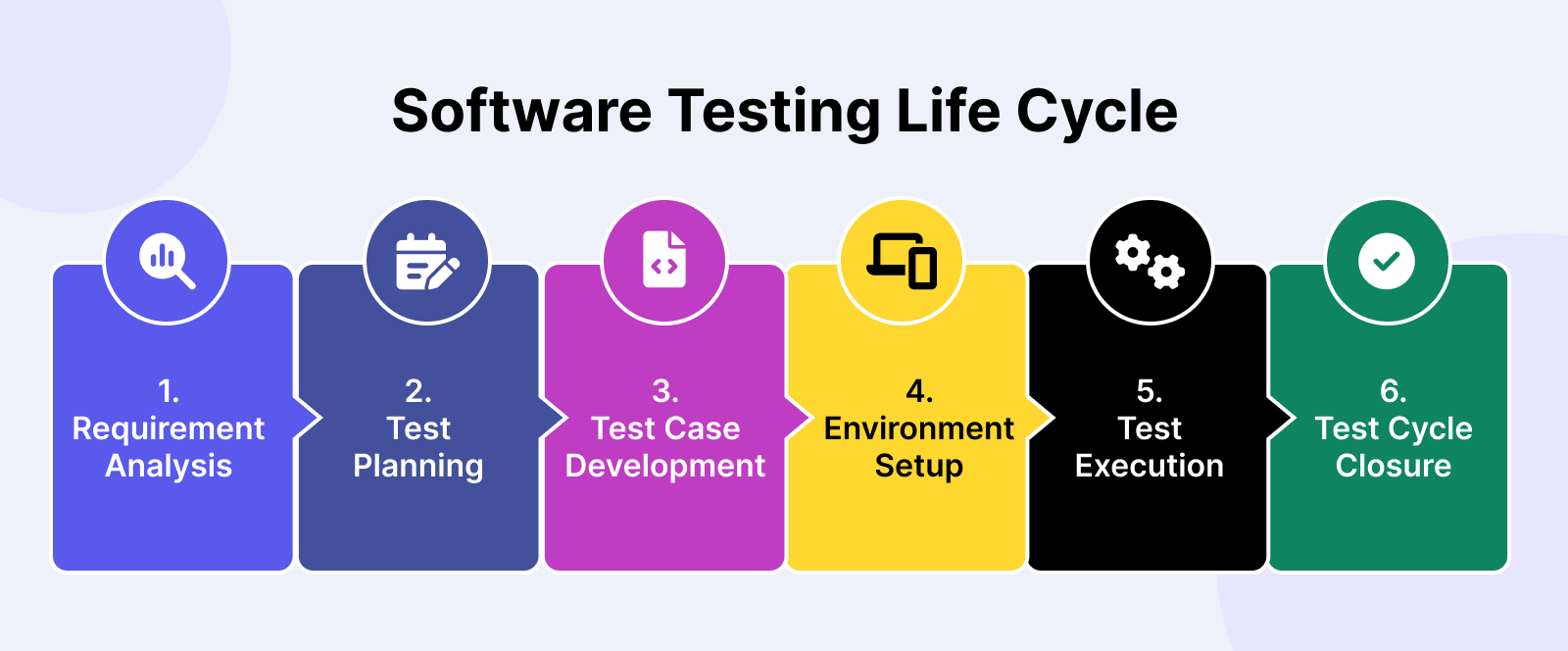
1. Requirement Analysis
In this stage, software testers work with stakeholders to identify and understand test requirements. Insights from these discussions are consolidated into the Requirement Traceability Matrix (RTM), which forms the foundation for building the test strategy.
There are three main people (the tres amigos) involved in this process:
- Product Owner: Represents the business side and defines the problem to be solved.
- Developer: Builds a solution that addresses the Product Owner’s problem.
- Tester: Ensures the solution works as intended and identifies potential issues.
2. Test Planning
After thorough analysis, a test plan is created. Test planning involves aligning with relevant stakeholders on the test strategy:
- Test objectives: Define attributes like functionality, usability, security, performance, and compatibility.
- Output and deliverables: Document the test scenarios, test cases, and test data to be produced and monitored.
- Test scope: Determine which areas and functionalities of the application will be tested (in-scope) and which ones won't (out-of-scope).
- Resources: Estimate the costs for test engineers, manual/automated testing tools, environments, and test data.
- Timeline: Establish expected milestones for test-specific activities along with development and deployment.
- Test approach: Assess the testing techniques (white box/black box testing), test levels (unit, integration, and end-to-end testing), and test types (regression, sanity testing) to be used.
3. Test Case Development
After defining the scenarios and functionalities to be tested, we start writing the test cases.
Here's what a basic test case looks like:
| Component | Details |
|---|---|
| Test Case ID | TC001 |
| Description | Verify Login with Valid Credentials |
| Preconditions | User is on the Etsy login popup |
| Test Steps | 1. Enter a valid email address. 2. Enter the corresponding valid password. 3. Click the "Sign In" button. |
| Test Data | Email: validuser@example.com Password: validpassword123 |
| Expected Result | Users should be successfully logged in and redirected to the homepage or the previously intended page. |
| Actual Result | (To be filled in after execution) |
| Postconditions | User is logged in and the session is active |
| Pass/Fail Criteria | Pass: Test passes if the user is logged in and redirected correctly. Fail: Test fails if an error message is displayed or the user is not logged in. |
| Comments | Ensure the test environment has network access and the server is operational. |
This is a test case to check Etsy's login.
When writing a test case, make sure your test cases clearly show what’s being tested, what the expected outcome is, and how to troubleshoot if bugs appear.
After that comes test case management, which involves tracking and organizing your test cases. You can do this using spreadsheets or tools like Xray for manual testing, or use automation tools such as Selenium, Cypress, or Katalon for faster results.

4. Test Environment Setup
Setting up the test environment involves preparing the software and hardware needed to test an app, like servers, browsers, networks, and devices.
For a mobile app, you’ll need:
-
Development environment for early testing:
- Tools like Xcode (iOS) or Android Studio (Android)
- Simulators/emulators for virtual testing
- Local databases and mock APIs
- CI tools to run automatic tests
-
Physical devices to catch real-world issues:
- Different models (e.g., iPhone, Galaxy)
- Various OS versions (e.g., iOS 14, Android 11)
- Tools like Appium for automated testing
-
Emulation environment for quick tests without physical devices:
- Android emulators and iOS simulators
- Various screen resolutions, RAM, and CPU configurations
- Debug tools in Xcode or Android Studio
5. Test Execution
With clear objectives in mind, the QA team writes test cases, test scripts, and prepares necessary test data for execution.
Tests can be executed manually or automatically. After the tests are executed, any defects found are tracked and reported to the development team, who promptly resolve them.
During execution, the test case goes through the following stages:
- Untested: The test case has not been executed yet at this stage.
- Blocked/On hold: This status applies to test cases that can’t be executed due to dependencies like unresolved defects, unavailable test data, system downtime, or incomplete components.
- Failed: This status indicates that the actual outcome didn’t match the expected outcome. In other words, the test conditions weren’t met, prompting the team to investigate and find the root cause.
- Passed: The test case was executed successfully, with the actual outcome matching the expected result. Testers love to see a lot of passed cases, as it signals good software quality.
- Skipped: A test case may be skipped if it’s not relevant to the current testing scenario. The reason for skipping is usually documented for future reference.
- Deprecated: This status is for test cases that are no longer valid due to changes or updates in the application. The test case can be removed or archived.
📚 Read More: A Guide To Understand Test Execution
6. Test Cycle Closure
Finally, you need a test report to document the details of what happened during the software testing process. In a test report, you can usually see 4 main elements:
- Visualizations: Charts, graphs, and diagrams to show testing trends and patterns.
- Performance: Track performance trends like execution times and success rates.
- Comparative analysis: Compare results across different software versions to identify improvements or regressions.
- Recommendations: Provide actionable insights on which areas need debugging attention.
Software testers will then gather to analyze the report, evaluate the effectiveness, and document key takeaways for future reference.
Popular Software Testing Models
The evolution of the testing model has been in parallel with the evolution of software development methodologies.
1. V-model
In the past, QA teams had to wait until the final development stage to start testing. Test quality was usually poor, and developers could not troubleshoot in time for product release.
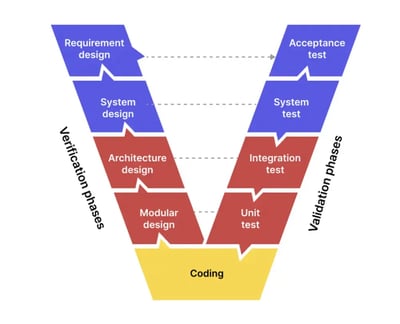
The V-model solves that problem by engaging testers in every phase of development. Each development phase is assigned a corresponding testing phase. This model works well with the nearly obsolete Waterfall testing method.
On one side, there is “Verification”. On the other side, there is “Validation”.
- Verification is about “Are we building the product right?”
- Validation is about “Are we building the right product?”
2. Test Pyramid model
As technology advances, the Waterfall model gradually gives way to the widely used Agile testing methods. Consequently, the V-model also evolved to the Test Pyramid model, which visually represents a 3-part testing strategy.
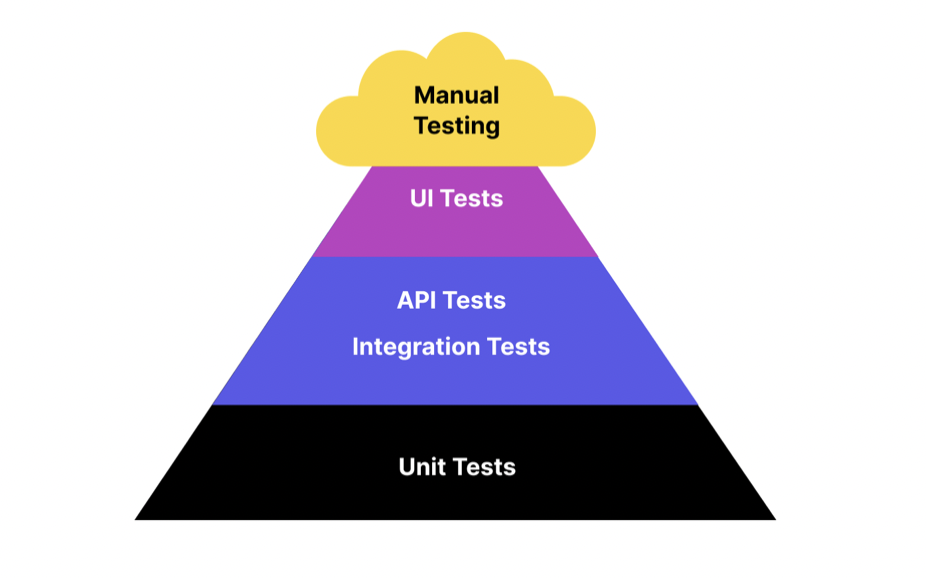
Most of the tests are unit tests, aiming to validate only the individual components. Next, testers group those components and test them as a unified entity to see how they interact. Automation testing can be leveraged at these stages for optimal efficiency.
📚 Read More: Test Pyramid: A Guide To Implement in Practice
3. The Honeycomb Model

The Honeycomb model is a modern approach to software testing in which Integration testing is a primary focus, while Unit Testing (Implementation Details) and UI Testing (Integrated) receive less attention. This software testing model reflects an API-focused system architecture as organizations move towards cloud infrastructure.
Manual Testing vs. Automated Software Testing: Which One to Choose?
| Aspect | Manual Testing | Automation Testing |
|---|---|---|
| Definition | Testing conducted manually by a human without the use of scripts or tools. | Testing conducted using automated tools and scripts to execute test cases. |
| Execution Speed | Slower, as it relies on human effort. | Faster, as tests are executed by automated tools. |
| Initial Investment | Low, as it primarily requires human resources. | High, due to the cost of tools and the time required to write scripts. |
| Accuracy | Prone to human error, especially in repetitive tasks. | More accurate, as it eliminates human error in repetitive tasks. |
| Test Coverage | Limited by human ability to perform extensive and repetitive tests. | Extensive, as automated tests can run repeatedly with large data sets. |
| Usability Testing | Effective, relying on human judgment and feedback. | Ineffective, as tools cannot judge user experience and intuitiveness. |
| Exploratory Testing | Highly effective, as humans can explore the application creatively. | Ineffective, as it requires human intuition and exploratory skills. |
| Regression Testing | Time-consuming and labor-intensive. | Highly efficient, as tests can be rerun automatically with each code change. |
| Maintenance | Lower, but can become tedious with frequent changes. | Requires significant maintenance to update scripts with application changes. |
| Initial Setup Time | Minimal, as it does not require scripting or tool setup. | High, due to the need to develop test scripts and set up tools. |
| Skill Requirement | Requires knowledge of the application and testing principles. | Requires programming skills and knowledge of automation tools. |
| Cost Efficiency | More cost-effective for small-scale or short-term projects. | More cost-effective for large-scale or long-term projects with repetitive tests. |
| Reusability of Tests | Limited, as manual tests need to be recreated each time. | High, as automated tests can be reused across different projects. |
📚 Read More: Automated Testing vs Manual Testing: A Detailed Comparison
Is Automated Testing Making Manual Testing Obsolete?
Automated testing takes software testing to the next level, enabling QA teams to test faster and more efficiently. So is it making manual testing a thing of the past?
The short-term answer is “No”.
The long-term answer is “Maybe”.
Manual testing is always needed because only humans can evaluate the application’s UX and supervise automation testing.
However, AI technology is gradually changing the landscape. Smart testing features have been added to many automated software testing tools to drastically reduce the need for human intervention.
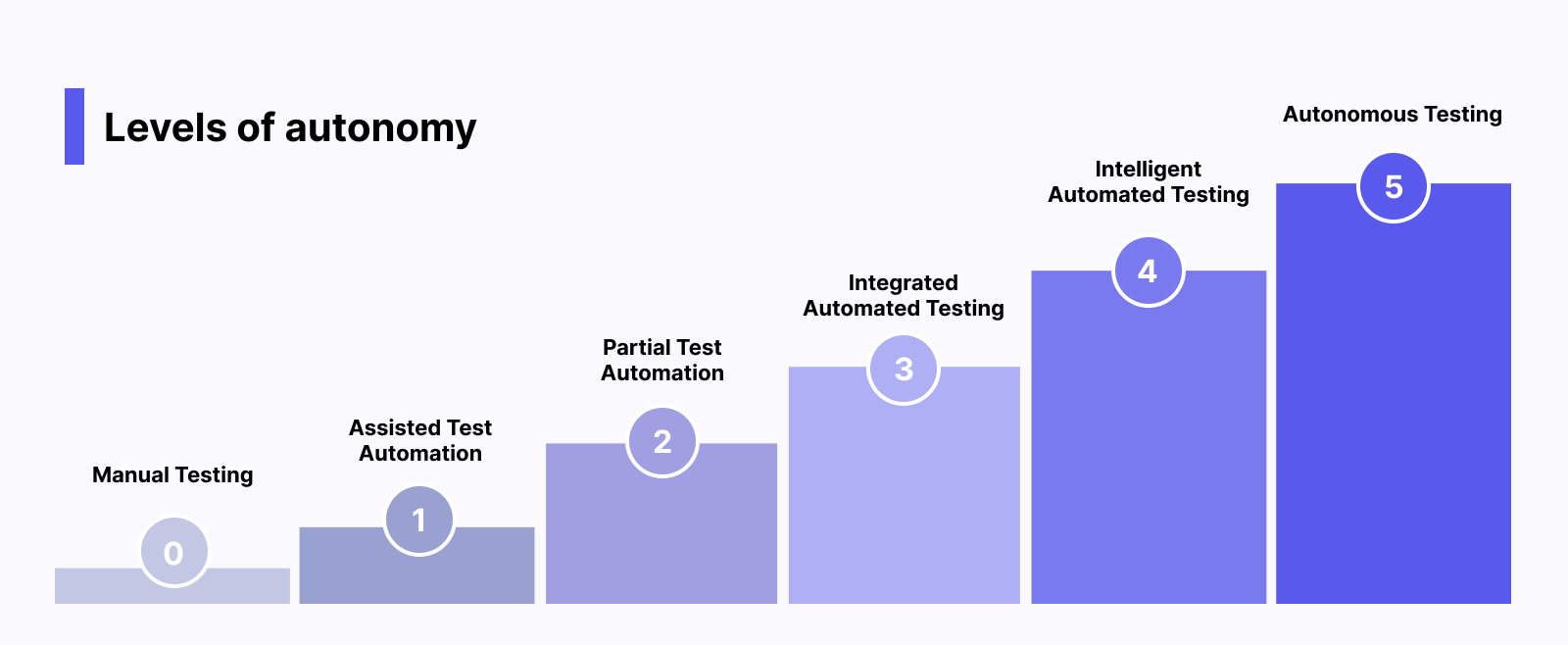
In the future, we can expect to reach Autonomous Testing, where machines completely take control and perform all testing activities. Many software testing tools have leveraged LLMs to bring us closer to this autonomous testing future.
This evolution is accelerating with the rise of agentic QA, where autonomous AI agents handle the full testing lifecycle, from planning and test generation through execution and maintenance, while human testers focus on strategy, risk assessment, and the judgment calls that AI can't make.
Top Software Testing Tools with Best Features
1. Katalon True Platform

Katalon True Platform is built around the principle that agentic testing is most valuable when it's paired with governance, traceability, and human oversight. It embeds AI agents across the entire quality lifecycle while keeping your team in the driver's seat.
Six purpose-built AI agents work across the lifecycle:
- Requirement Analyzer reads your requirements, identifies ambiguities and gaps, and collaborates with you to define a testing plan before a single test is written.
- Test Generation Agent creates the minimum set of tests needed for coverage, then helps expand into edge cases, negative scenarios, and automated scripts.
- Autonomous Test Runner executes natural-language test cases without automation scripts, capturing screenshots and video at every step.
- Bug Reporter generates structured bug reports from failed results and files them directly to Jira or Azure DevOps.
- Root Cause Analyzer pinpoints why tests fail and recommends fixes, cutting triage time dramatically.
- Report & Insight Generator provides release readiness insights through natural language Q&A, so stakeholders get answers without digging through dashboards.
These agents operate within a unified platform that spans automation, manual testing, execution, analytics, test management, and production monitoring. They integrate natively with CI/CD pipelines, Jira, and modern DevOps toolchains. And critically, every agent action is logged and traceable, giving organizations the accountability layer they need to ship with confidence.
Katalon True Platform supports different types of testing through web, mobile, API, and desktop testing across no-code, low-code, and full-code approaches. Whether you're a QA engineer writing Groovy scripts or a business analyst defining test cases in plain language, the platform meets you where you are and grows with your team.

2. Selenium
 Selenium is a versatile open-source automation testing library for web applications. It is popular among developers due to its compatibility with major browsers (Chrome, Safari, Firefox) and operating systems (Macintosh, Windows, Linux).
Selenium simplifies testing by reducing manual effort and providing an intuitive interface for creating automated tests. Testers can use scripting languages like Java, C#, Ruby, and Python to interact with the web application. Key features of Selenium include:
- Selenium Grid: A distributed test execution platform that enables parallel execution on multiple machines, saving time.
- Selenium IDE: An open-source record and playback tool for creating and debugging test cases. It supports exporting tests to various formats (JUnit, C#, Java).
- Selenium WebDriver: A component of the Selenium suite used to control web browsers, allowing simulation of user actions like clicking links and entering data.
Website: Selenium
GitHub: SeleniumHQ
3. Appium

Appium is an open-source automation testing tool specifically designed for mobile applications. It enables users to create automated UI tests for native, web-based, and hybrid mobile apps on Android and iOS platforms using the mobile JSON wire protocol. Key features include:
- Supported programming languages: Java, C#, Python, JavaScript, Ruby, PHP, Perl
- Cross-platform testing with reusable test scripts and consistent APIs
- Execution on real devices, simulators, and emulators
- Integration with other testing frameworks and CI/CD tools
Appium simplifies mobile app testing by providing a comprehensive solution for automating UI tests across different platforms and devices.
Website: Appium Documentation
Conclusion
Software testing isn't a box to tick before shipping. It's the difference between software your users trust and software that lets them down at the worst possible moment.
The fundamentals haven't changed: find defects early, understand what you're testing and why, and choose the right approach for the job. What has changed is how much is now possible. AI-powered testing, autonomous test execution, and continuous testing in CI/CD pipelines mean QA teams can cover more ground, faster, than ever before.
But none of that replaces good thinking. The best testing strategy combines the speed and scale of automation with the judgement and curiosity that only humans bring. Know when to automate, know when to explore manually, and never treat a green test report as proof that nothing can go wrong.
Get testing right, and it becomes one of your biggest competitive advantages. Users don't see your test suite. They just know your software works.
|
