


.svg)

Selenium has always been a much loved library for web automation testing. Its compatibility with a wide range of browsers, platforms, and languages make it an ideal choice for any QA team. However, there's always a catch, and testers who have used Selenium to automate their web testing know the pain.
Selenium's Architecture, and Why Teams Look for Alternatives
Selenium WebDriver's architecture is built on three components: WebDriver, the browser-specific Drivers (like ChromeDriver or GeckoDriver), and the Browser itself. These three communicate over HTTP, sending requests and receiving responses as RESTful services, which is also why Selenium WebDriver is a W3C Recommendation.
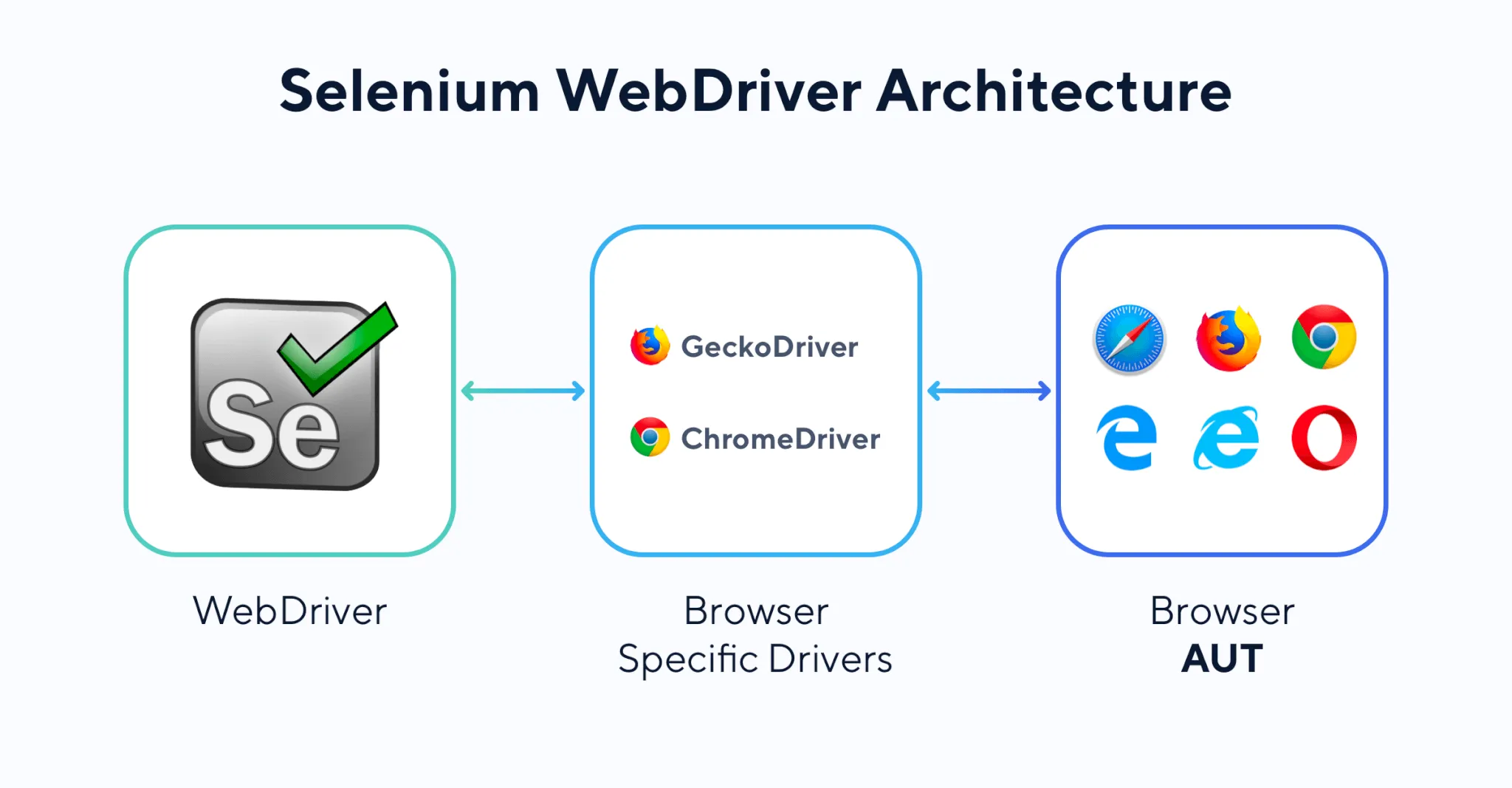
This design is simple, loosely coupled, and open by nature: each component has one job, changes to one rarely break the others, and the open standard has attracted broad community support. That's exactly why Selenium became the default choice for cross-browser, cross-language test automation.
The same design choices that make Selenium flexible also explain why so many teams eventually go looking for something else:
- A steep learning curve: Selenium is a library, not a framework. Effective use means understanding Selenium's API, test artifact structure, design patterns, coding standards, and reporting plugins, all before writing a useful test. Testers without a programming background often hit a wall here.
- High maintenance: every UI change means updating the underlying test scripts, and at scale, that upkeep becomes a full-time job.
- No built-in reporting or logging: teams have to bring in and configure third-party plugins (like Extent Reports or Allure) just to get readable test output.
- No native test data separation: Selenium doesn't separate automation scripts from test data out of the box, which drives up maintenance cost and makes scripts harder to reuse.
- No asset management: there's no built-in way to organize and manage test scripts, data, and objects as a shared library across a project.
These gaps are exactly what pushed the market toward comprehensive, batteries-included alternatives. A good Selenium alternative should outweigh Selenium in terms of:
- Feature set
- Usability
- Cost
- Learning curve
- And more
In this article, we'll cover 7 of the best alternatives, with detailed reviews, feature highlights, and pricing details for each:
- Katalon
- Cypress
- Puppeteer
- Playwright
- Testim
- TestComplete
- Watir
1. Katalon
 Katalon is a strong Selenium alternative for teams that want to create, run, and manage automated tests without stitching together multiple tools. Instead of using Selenium as a standalone library, teams can use Katalon Studio for authoring and Katalon True Platform for organizing execution, visibility, and collaboration in one connected workflow.
Here’s how Katalon’s core products fit together:
- Katalon Studio: the desktop IDE for creating and maintaining automated tests across web, API, mobile, and desktop. Teams can build tests with low-code keywords, record-and-playback, or code in Java/Groovy. Results can then be synced into Katalon True Platform for centralized reporting and collaboration.
- Katalon True Platform: the unified workspace for managing test assets, tracking execution, reviewing results, and improving team visibility and collaboration across the testing lifecycle.
- Katalon Test Execution Cloud: Katalon’s cloud execution environment for running automated tests across scalable browser and device infrastructure without managing it yourself.
→ Check out the reviews of Katalon on G2
To start using Katalon, simply download Katalon Studio:
Download & Start Testing Within Minutes
Here's a snapshot of the keywords in Katalon Studio. You can see how easy it is to automate almost any action on the web just by clicking the right keyword.

📚 Read More: Katalon vs Selenium: A Detailed Comparison
Here's a comparison table to understand the differences between Katalon and Selenium:
| Selenium | Katalon | |
|---|---|---|
| Installation and setup | Configure your project with the necessary libraries and dependencies. | Download Katalon Studio to create and run tests, or use Katalon True Platform to manage execution visibility, reporting and collaboration across your testing workflow. |
| Create tests | Script tests using a programming language and IDE of your choice. | Low-code: record-and-playback, or drag-and-drop from a keyword library. Code: script in Java or Groovy. |
| Run tests | Requires setup for web servers, databases, and test environment integrations (local, CI, or cloud). | Little to no setup needed for local, CI, cloud, or other external test environments, including parallel execution. Read more: What is Katalon Test Execution Cloud? |
| Test reporting & analytics | Requires third-party plugins like Extent Reports or Allure. | Built-in reporting includes local result export plus connected visibility through Katalon True Platform, where teams can review execution results, trace quality activity, and collaborate more easily across projects. |
| Manage | Define your own test hierarchy using design patterns like Page Object Model and data-driven testing. | Popular patterns are already implemented for script and test reusability: Object Repositories (Page Object Model), BDD (Cucumber), data-driven testing, and keyword libraries by app type. |
| Extensibility & customization | Open source means you can build whatever you want, but feature sets and integrations have to be built and tailored yourself. | Working with a pre-built framework means working within what the vendor provides. Free plans include forum and community support; paid plans add a dedicated onboarding manager and customer support. |
| Supported application types | Libraries are typically dedicated to a single application type, so teams often build and maintain separate frameworks for web (Selenium), mobile (Appium), API (SoapUI), and desktop (WinAppDriver). | An all-in-one approach centralizes web, mobile, API, and desktop testing in one platform, cutting down on separate learning curves. |
If you're already using Selenium for test automation, chances are you have a repository of regression test cases, and migrating those tests to another platform can be a messy ride. Here's an insightful webinar about migrating from Selenium to Katalon that answers a lot of the questions anyone considering switching would have:
Start Your Katalon Free Trial Now
2. Cypress

Cypress is an open-source test automation platform that has gained significant traction in the testing community thanks to its developer-friendly interface and robust features. Its ability to run tests within the same environment as the application under test is a standout feature, making test creation and debugging more straightforward, and a good alternative to Selenium.
The tool's quick setup and ability to handle complex interactions on web applications contribute to its appeal. Its time-traveling feature, automatic waiting, and built-in assertions also help testers write more reliable tests.
Highlighted Features:
- Provides a live view of test execution, displaying test steps, commands, and associated elements in real time.
- Allows users to visually see the application's state at each step of the test, simplifying debugging.
- Intelligently waits for elements to appear, actions to complete, or assertions to be verified, reducing test flakiness.
- Simplifies verification of elements, behaviors, and state changes within the application under test, reducing reliance on external libraries.
- Captures network requests, responses, and console logs during test execution for detailed inspection and analysis.
- Operates within the same run loop as the application being tested, providing direct access to application state.
- Known for its simple setup and installation process without additional dependencies.
Website: Cypress
Read More: Katalon vs Cypress
3. Puppeteer

Puppeteer is a Node library that provides a high-level API over the Chrome DevTools Protocol, allowing for control and interaction with headless Chrome or Chromium browsers. It's commonly used for automated testing, web scraping, and other web interaction tasks.
Highlighted Features:
- Operates in headless mode by default, suitable for automated tasks without a visible browser interface.
- Leverages the Chrome DevTools Protocol for direct interaction and control of the browser.
- Tends to offer faster performance compared to Selenium due to its direct communication with the browser.
- Utilizes modern JavaScript features and syntax, appealing to developers comfortable with newer standards.
- Allows interception and modification of network requests for testing or scraping scenarios.
- Provides easy functionality to capture screenshots and generate PDFs of web pages, and lets users interact with pages by clicking elements, filling forms, and navigating.
- Offers a simplified, straightforward API for common actions, making it user-friendly.
Website: Puppeteer
Read More: Top 7 Puppeteer Alternatives
4. Playwright

Playwright is a testing and automation framework similar to Puppeteer but with expanded capabilities. It's developed by Microsoft and offers powerful tools for browser automation and testing.
Highlighted Features:
- Supports multiple browsers (Chromium, Firefox, and WebKit), whereas Selenium focuses on Chrome, with other browsers supported through WebDriver implementations.
- Extends automation beyond web pages to tasks like automating interactions with iframes, cross-tab interactions, and more complex scenarios.
- Automatic waiting strategies make tests more stable and less prone to timing-related issues.
- Detailed tracing capabilities allow for in-depth inspection and analysis of tests and interactions.
- Captures snapshots during test runs, aiding in understanding and verifying the state of the application at different points, a feature not as integrated in Selenium.
Website: Playwright
5. Testim

Testim is an AI-powered test automation platform designed to simplify and enhance the creation and execution of automated tests for web applications. It's focused on enabling testers to create robust, codeless tests using AI capabilities. With Testim, people without coding skills can quickly create end-to-end tests using its recording functions, while people with coding skills can leverage their expertise to enhance those capabilities further, combining the strengths of both approaches.
Testim was acquired by Tricentis in 2022 and is now marketed as Tricentis Testim, though it's still widely referred to simply as Testim.
Testim enhances test maintenance with its smart locators method. This method examines every element used in testing and assigns weights to hundreds of attributes for each element, so even if one attribute (like an ID) changes, Testim can still locate the element, preventing test failures, a real advantage over Selenium.
Highlighted Features:
- Uses AI algorithms to create, maintain, and execute tests, intelligently adapting to UI changes and reducing the need for constant manual updates.
- Offers a codeless testing environment, letting users create tests through a visual interface without extensive coding knowledge.
- Uses AI to automatically identify and adapt to UI changes, keeping tests resilient.
- Automatically adjusts tests when the UI changes, reducing maintenance effort.
- Facilitates collaboration by allowing shared access to test creation and results.
- Supports testing across multiple browsers, ensuring application compatibility and consistency.
- Allows tests to run concurrently, speeding up the overall testing process.
Website: Testim
6. TestComplete

TestComplete is a comprehensive automated testing platform developed by SmartBear Software. It offers a wide range of features for automated UI testing of desktop, web, and mobile applications.
Highlighted Features:
- Quickly record and configure web or mobile tests using customized JavaScript steps.
- AI-powered Smart Locators understand your app, lock in elements, and self-improve for stability.
- Reduces maintenance with well-architected, clean tests built with the help of AI.
- Expedites failure analysis with error aggregation, suggestions, comparison screenshots, and parsed logs.
- Helps find and fix issues without requiring specialized expertise.
- Effectively controls changes and simplifies the management of teams and tests.
- Delivers insights to prove your app's quality and guide transformation.
Website: TestComplete
7. Watir

Watir, short for Web Application Testing in Ruby, is an open-source library for automating web browsers. It's primarily used for web application testing and supports Internet Explorer on Windows, as well as Firefox, Chrome, and Edge on Windows and Linux.
Highlighted Features:
- Uses Ruby as its scripting language, known for simplicity and readability, making scripts easier to write and understand for beginners and experienced testers alike.
- Enables testers to ensure web application compatibility across different browsers.
- Accessible to a wide range of users and projects with budget constraints.
- Seamlessly integrates with Behavior-Driven Development (BDD) frameworks like Cucumber.
- Backed by active forums and documentation for user support and knowledge sharing.
Website: Watir Github
Conclusion
Selenium remains a popular framework for web testing and development, but there are many Selenium alternatives available that may better suit your needs depending on your specific use case. When exploring these options, weigh their pros and cons to find the best fit for your team and improve your web testing and development workflow.

|
