



.svg)
.png)
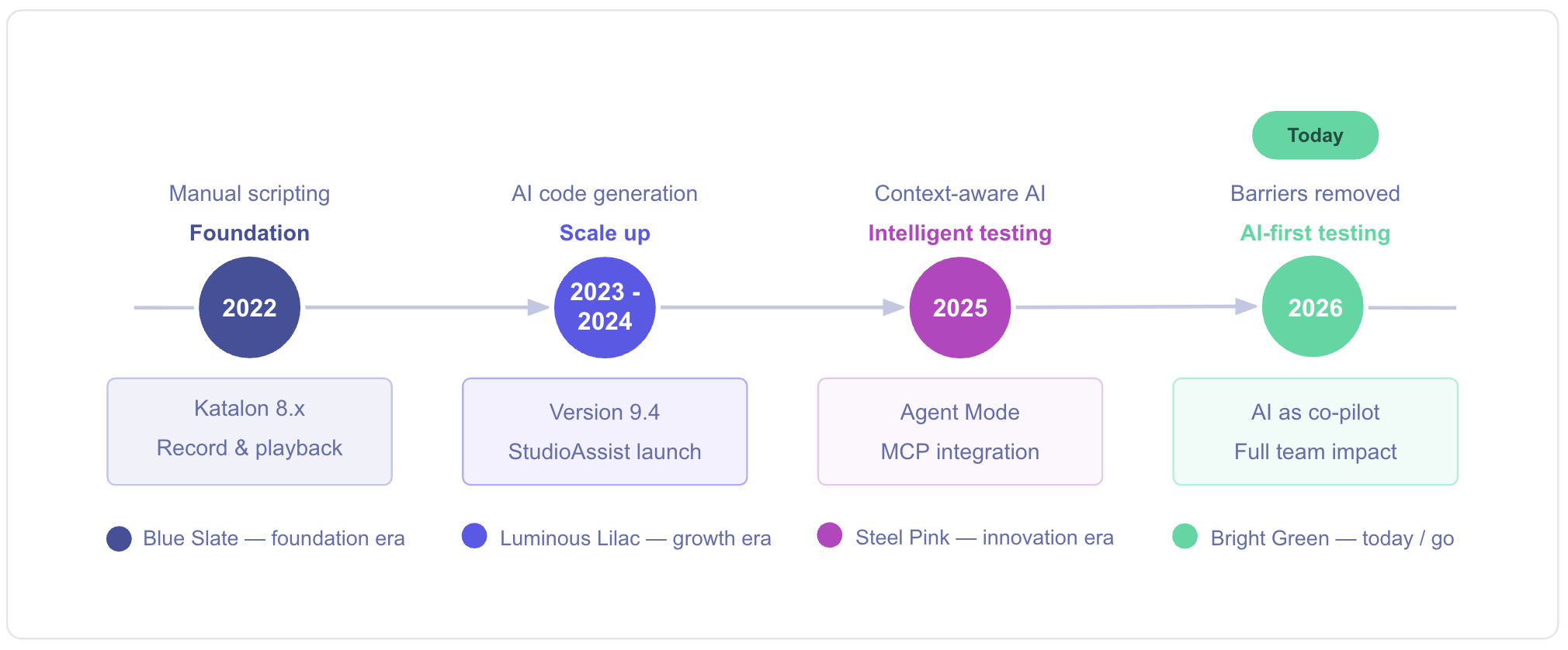
In early 2022, when I first began interacting with Katalon Studio, I was a fairly typical automation engineer: curious, sometimes overwhelmed, and thoroughly reliant on record-and-playback techniques for testing. Katalon was already one of the most integrated solutions in its space, especially when compared to piecing together open-source solutions.
Four years later, after having been introduced to the latest versions of Katalon Studio and StudioAssist, my regular testing activities have been completely revolutionized, and AI is now a key part of the processes by which I develop, write, debug, and maintain tests.
This blog will continue to describe this transition from 2022 to 2026 and show how AI can be easily integrated into an automation process, even for people who are just beginning their experience with the technology.
2022: Building Proficiency with Katalon Studio
In early 2022, my introduction to Katalon began around the time of the 8.x release series, when Katalon Studio had already gained recognition as a one-stop solution for web, API, mobile, and desktop testing. The most noticeable features around that time were:
-
A predefined framework: The presence of pre-defined frameworks for test cases, test suites, and test suite sets obviated the need to dedicate a lot of time to designing a framework from scratch.
-
Record and playback with scripting: Users could start with Manual/Record capabilities and then gradually move on to Scripting capabilities once their knowledge of Groovy scripting improved.
-
Strong integrations: CI/CD tools, reporting tools, and the overall Katalon Platform (TestOps, TestCloud) were integrated seamlessly without the need to integrate multiple tools.
At that point, I felt that “AI in testing” was a notion that was still quite far away. I was focused on the basics: locators, assertions, data-driven testing, and making sure that CI runs were successful.
2023-2024: Handling Large-Scale Projects and Real-World Complexity
As the project grew the things we needed to look at also got bigger such, as:
-
The number of test cases, test environments, and data sets.
-
The ability to run UI and API tests in the same pipelines.
-
The presence of teams with varied skill sets, ranging from manual testers to skilled scripters.
Katalon's platform successfully met increasing needs. Katalon TestOps centralized results for historical analysis and comprehensive oversight.
A major shift occurred with AI integration in Katalon Studio. Version 9.4 introduced StudioAssist, an AI assistant within the IDE for automatic code generation and explanation. The combination of Katalon Studio and TestOps was transformative, marking the first time AI directly aided integrated test script generation and understanding, rather than functioning as a separate tool.
2025-2026: StudioAssist and Agent Mode Redefine the Landscape
I have used Katalon for a while now. They have made some major changes with StudioAssist and Agent Mode. Katalon is no longer just an Integrated Development Environment with some AI features. It is now a testing partner that uses intelligence to help users.
The StudioAssist Agent Mode does a lot of things. It uses the MCP servers that are connected to Katalon Docs and the Studio environment. This means it can do more than just give suggestions. It can actually work on the project.
From my perspective as both a practitioner and Katalon Academy instructor, this changed three big things:
-
How fast beginners can get productive.
-
How easy is it for teams to maintain and refactor their test suites?
-
How naturally AI fits into daily automation tasks—without replacing our judgment.
-
Moving on to a formal analysis through specific examples.
Scenario 1: “Explain Code” – Unpacking Unclear Code into Learning Opportunities
Starting a late-stage automation project is often daunting due to the need to quickly understand another team member's complex, detailed test code, which can involve chained API calls, custom keywords, nested loops, and JSONPath assertions. This is where the StudioAssist's Explain Code tool proves highly useful, simplifying the code comprehension process.
Usage of “Explain Code”
Assume someone who is switching from Manual to Script mode and analyzing an API test code snippet like this:
def response = WS.sendRequest(findTestObject('API/Login'))
WS.verifyResponseStatusCode(response, 200)
def token = WS.getElementPropertyValue(response, 'data.token')
assert token != null
One might understand the status code assertion but not the entire token retrieval mechanism or the purpose of getElementPropertyValue.
Using the Explain Code tool in StudioAssist, one can:
- Select the relevant code snippet in Script mode.
- Access the Explain Code option from StudioAssist through the right-click context menu.
- Get a natural language explanation of the code functionality, the reasoning behind the choice of methods.
For beginners, this tool is an effective way to turn existing tests into bite-sized learning modules.
For experienced users, it’s a quick way to review complex logic before refactoring or expanding.
Real Impact
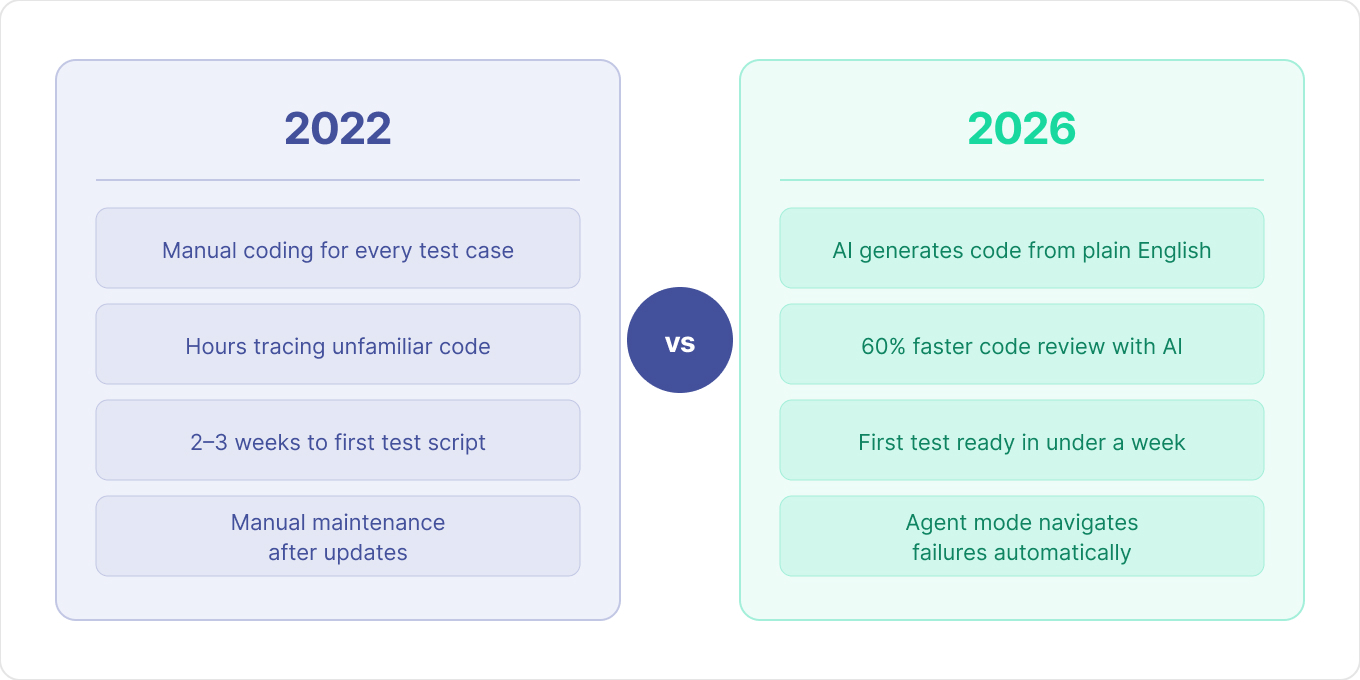
Using Explain Code reduced my code review time by approximately 60%. What previously took 2-3 hours of tracing through unfamiliar test logic now takes 30-45 minutes with AI-assisted explanations.
Explanation
This tool shifts the focus from 'What does this test do?' to 'How can I improve this test?' - with AI serving as the bridge between understanding and enhancement.
Scenario 2 (Beginner’s Perspective): From Plain Language to Operational Test Scripts
From a beginner's viewpoint, this chapter explains how AI aids the initial weeks of using Katalon Studio. After installation, the user, familiar with the Manual perspective but hesitant with Script, has recorded flows and created Test Objects. The section will step-by-step detail how StudioAssist facilitates test case creation from plain language.
Illustrative Example: An Initial Login Test Using AI
Suppose there is a need to automate a simple login test for a sample application.
1. Launch a new test case and select the Script perspective.
2. In the script editor, describe the test actions in plain English, for example:
- Open the browser and go to the login page.
- Type username "John Doe" in the username input field.
- Type password "ThisIsMyPassword" in the password input field.
- Click the Login button.
- Check that the Dashboard page is shown.
- Close the browser.
3. Select the whole text, Add Block Comment to comment out the text.
4. Again, select the commented-out text, right-click, and select StudioAssist → Generate Code.
StudioAssist will then produce a full Groovy-based test script that:
- Uses existing Test Objects from the Object Repository (such as the username, password, and login elements).
- This will add the things we need like WebUI.openBrowser, WebUI.setText, WebUI.click and the statements that help us verify everything is working correctly with the WebUI.
- Handles imports and the basic framework to avoid compiler errors.
At this point, the test script can be run to see the end-to-end functionality, allowing analysis by reviewing the generated script. Each new test script created can serve as both a learning tool and an automated process.
Importance for new users:
- The learning process begins from known territory (English test script statements).
- AI handles the unknown parts, such as the precise syntax, API calls, and imports.
- With time, script patterns are learned by observing the output generated by StudioAssist.
Real Impact:
New team members who previously needed 2-3 weeks to write their first independent test script can now create functional tests within their first week using StudioAssist's plain-language generation.
AI in Daily Automation: Reaching Beyond Individual Test Cases
After mastering individual tests, artificial intelligence can be applied to almost every aspect of the automation process, such as:
- Test Suites: As test suites grow in size, AI assistance (in Agent mode) can group similar test cases into suites, such as building a smoke test suite for all login and checkout tests.
- Troubleshooting: When tests break after an application update, Agent mode can fetch relevant information from Katalon Docs, point out typical problems, and provide solutions right in the project.
Practical Implications include:
- Less time on boilerplate.
- Faster training for new members.
- More time devoted to high-priority tasks like designing a comprehensive coverage strategy and informed decisions on the scope of automation.
Looking Back: 2022 vs 2026 (and What’s Next)
Comparison between the Katalon workflow in 2022 and the current state shows a dramatic change:
- In 2022, the tester spent most of the time manually coding and maintaining code, even though the platform offered a strong underlying foundation framework.
- In 2026, while the tester is still accountable for the overall strategy and quality decisions, AI in Katalon today supports and performs a significant part of the operational dynamics, such as script writing, code explanation, object help, and failure navigation.
The Katalon official support channels (Docs, Academy, and the Katalon Blog) now feature extensive AI-supported testing resources, reflecting how central AI has become to modern test automation.
As an Academy instructor and practitioner, I've seen firsthand that the real story isn't "AI will replace testers." It's "AI removes the barriers that kept talented people from making an impact."
Here's what makes 2026 different from 2022: newcomers don't need four years to reach proficiency anymore. You can install Katalon Studio today, enable StudioAssist, and work with AI assistance from test one.
The path forward is clearer than ever:
Month 0 (preparation): Use AI to explain existing test code, build knowledge, and generate initial tests from plain language.
Month 1: Refactor and optimize with AI handling syntax while you focus on logic
Month 2: Collaborate with your team, apply AI-assisted approaches to shared test suites, and refine your automation strategy
Month 3: Mentor others using the same AI-assisted approach that accelerated your learning
Four years ago, I was intimidated by complex test frameworks and verbose scripting requirements. Today, I teach new automation engineers who write sophisticated test suites in their first month, not because they're smarter, but because they have better tools.
The question isn't whether AI will transform testing. It already has.
The question is: Will you be part of shaping what that transformation looks like?
Start today. Experiment fearlessly. Share what you learn. The testing community, and your future self, will thank you.
|
