


.svg)

Software testing is a comprehensive umbrella term for many different testing types. These types are grouped based on purpose, application under test (AUT), or approach. Understanding these distinctions helps teams build better test plans.
In this article, we’ll explore how testing types are categorized, the 15 most popular testing types, and where they fit in the Software Testing Life Cycle. Specifically, we will cover:
- Unit Testing
- Integration Testing
- End-to-end Testing
- Manual Testing
- Automation Testing
- AI Testing
- Functional Testing
- Visual Testing
- Performance Testing
- Regression Testing
- Compatibility Testing
- Accessibility Testing
- Smoke Testing & Sanity Testing
- White Box & Black Box Testing
- Testing for Different AUTs
THE SHORT ANSWER
How QA testing types break down, at a glance:
• Six categorization models exist: by application under test, application layer, attribute, approach, granularity, or technique, with approach (manual, automated, or AI-driven) as the broadest.
• Manual testing still owns exploratory, ad hoc, and usability work; automation and AI testing scale the repetitive, high-volume checks. Neither approach fully replaces the other.
• AI testing is now its own category: generating test cases, healing broken locators, and telling real visual bugs apart from harmless UI noise.
• The right mix of types, not any single one, is what builds a test plan that catches issues before release.
The breakdown below covers all 15 types in order, with what each one checks and when it earns a place in your plan.
Categorization For Testing Types
There are 6 major ways to categorize (or name) testing types:
- By Application Under Test (AUTs): grouping based on the type of software being tested (web, mobile, desktop, etc.)
- By application layer: grouping based on the three-tier architecture—UI, backend, or API
- By attribute: grouping based on characteristics being tested (visual, functional, performance, etc.)
- By approach: grouping based on the testing strategy (manual, automated, or AI-driven)
- By granularity: grouping based on scope and detail (unit testing, end-to-end testing, etc.)
- By testing techniques: grouping based on how tests are designed and executed; examples include black-box, white-box, and gray-box testing
There is a hierarchy to these categories, with the most inclusive being categorization by approach. For example, automated testing is simply testing with the help of automation scripts or tools, and most testing types can be automated.
15 Different Types of QA Testing
1. Unit Testing
Unit testing is a critical software development practice. It involves testing small parts of an application in isolation—functions, methods, modules, or classes. These individual units make up the entire application, and if they don't function properly on their own, they won't work well together. Unit testing ensures each component works correctly before integration.
A unit test usually requires:
- Test Fixture: prepares the environment and initial states for controlled execution.
- Test Case: verifies the behavior of the unit being tested.
- Test Runner: orchestrates execution of multiple unit tests and reports results.
- Test Data: values simulating real user inputs.
- Mocking and Stubbing: substitutes for external dependencies during testing.
Read More: What is Unit Testing? A Complete Guide
2. Integration Testing

Integration testing is a software testing method where components are combined and tested together as a whole. These components have passed unit testing, but issues may arise when they interact. Integration testing uncovers conflicts that appear when modules are integrated.
Common strategies include:
- Big Bang Approach: integrate all components and test at once.
- Incremental Approach: integrate and test components in logical groups.
Incremental testing can be performed using:
- Bottom-up approach: test smaller components first, then larger ones.
- Top-down approach: test larger components first, then smaller ones.
- Sandwich approach: combination of top-down and bottom-up.
Read More: What is Integration Testing?
3. End-to-end Testing
End-to-end testing (E2E testing) verifies the functionality and performance of an entire application from start to finish by simulating real-world scenarios and replicating live data.
It helps testers understand the application from the end user’s perspective, ensuring strong quality before release.
4. Manual Testing
Manual testing is the process of evaluating software manually without automation tools. Testers interact with the system as real users to uncover bugs that impact experience.
Manual testing is the traditional method. It is resource-intensive and slow, which is why many teams rely on automation. However, certain types of testing still require manual execution, especially when creativity and intuition are needed:
- Ad hoc testing: spontaneous testing without predefined plans, relying on intuition.
- Exploratory testing: similar to ad hoc but more structured, involving learning and testing simultaneously.
- Usability testing: evaluates user-friendliness and overall experience from a human perspective.
5. Automation Testing (or Automated Testing)
Automated testing, in contrast with manual testing, uses automation frameworks and automation testing tools to automatically run a suite of test cases. The entire process from test creation to execution requires minimal human intervention, reducing manual effort while increasing accuracy and efficiency.
6. AI Testing
AI testing evaluates system functionality, performance, and reliability using AI. It follows the traditional Software Testing Life Cycle, but AI techniques such as Machine Learning, NLP, and Computer Vision enhance every stage, supporting tasks that previously required human intelligence like data analysis, planning, and decision-making.
Several powerful ways AI supports testers include:
- Generating test cases autonomously based on user behavior data.
- Recommending manual test cases based on the test plan.
- Automatically waiting for required elements to appear before continuing test execution.
- Automatically fixing broken locators and using updated selectors in subsequent runs.
7. Functional Testing
Functional testing verifies whether the application's features work according to specified requirements. It can be performed manually or with automation tools. Common functional test cases include:
- Verifying successful login with valid credentials.
- Verifying system behavior with invalid login credentials.
- Verifying product search functionality.
- Verifying backend data flow.
Read More: Top 8 Automated Functional Testing Tools
8. Visual Testing
Visual testing focuses on verifying the visual aspects of an application's UI. It examines graphical elements, layout, and overall appearance to ensure they match expected design and behavior.
Testers evaluate many visual aspects, including:
- Size
- Width
- Length
- Position
- Visibility
- Readability
- Alignment
- Consistency across screen resolutions
Normally, testers rely on their own eyes to spot visual issues. If they automate visual testing, they usually apply the screenshot comparison method to compare a baseline image of the UI with the current UI to detect pixel-level differences. Even a 1-pixel deviation can be caught using this approach.
However, pixel differences don’t always indicate real visual defects. Modern interfaces contain dynamic elements such as dates, timestamps, or eCommerce cart counters. Automated scripts flag these changes as bugs, even though real users don’t perceive them as problems.
This is why testers benefit from AI-augmented visual testing tools that can distinguish between true user-impacting issues and benign visual variations.
9. Performance Testing
Performance testing evaluates an application's responsiveness and stability under different conditions. Its purpose is to measure how the system behaves in terms of speed, scalability, resource usage, and overall reliability.
Common subtypes include:
- Load testing: Simulates normal and peak user loads to observe how response times and stability change.
- Stress testing: Pushes the system beyond its limits to determine its breaking point and reveal bottlenecks, helping teams optimize infrastructure and resource allocation.
10. Regression Testing
Regression testing is performed after code updates to ensure new changes haven’t introduced defects. Since new logic can interfere with existing functionality, QA teams often maintain a regression suite of key test cases and run it after every update to maintain stability and reduce defects.

11. Compatibility Testing
Compatibility testing ensures an application works correctly across multiple browsers, devices, operating systems, and environments. Its purpose is to confirm consistent behavior regardless of configuration. Variants include:
- Cross-browser testing
- Cross-device testing
- Cross-platform testing
12. Accessibility Testing
Accessibility testing verifies whether digital products can be used by individuals with disabilities or impairments. It aims to identify and remove accessibility barriers. QA teams check the accessibility of:
- Keyboard navigation
- Screen readers
- Color contrast
- Alt text
- Multimedia elements
13. Smoke Testing & Sanity Testing
Smoke and sanity tests are quick assessments that validate basic functionality. They help determine whether deeper testing should proceed. Their purposes are similar, but their scopes differ.
| Aspect | Smoke Testing | Sanity Testing |
|---|---|---|
| OBJECTIVE | Verify critical functionalities. | Validate recent changes or fixes. |
| SCOPE | Broad, covers major functionalities. | Focused on specific areas affected by updates. |
| DEPTH | Shallow and brief. | Limited regression testing. |
| PURPOSE | Identify show-stopper issues. | Confirm changes did not introduce major defects. |
| EXECUTION TIME | Quick, run after each build. | Quick, run after small releases or bug fixes. |
| DECISION | Determine if further testing can proceed. | Determine if the application is stable for comprehensive testing. |
| RELATIONSHIP | Precedes deeper testing. | Subset of regression testing. |
| OUTCOME | A pass indicates major functions work. | A pass indicates recent updates are stable. |
| FAILURE HANDLING | Failures require investigation before full testing. | Failures must be fixed before full regression testing. |
Read More: Sanity Testing vs Smoke Testing
14. White Box & Black Box Testing
White box testing examines the internal structure of the software, similar to being able to see inside a white box. In contrast, black box testing validates functionality without any knowledge of internal code, like evaluating a sealed black box.
15. Testing For Different Types Of Applications
Different types of applications under test (AUT) require different testing approaches. Common AUT-based testing types include:
- Web Testing
- Desktop Testing
- API Testing
- Mobile Testing
Beyond these established testing types, a new category is emerging: agentic QA. Rather than describing a specific test technique, agentic QA refers to an approach where autonomous AI agents plan, execute, and maintain tests across multiple testing types simultaneously, adapting as the application changes. That's where we are headed with Katalon True Platform.
Katalon True Platform - The AI Platform for Software Quality
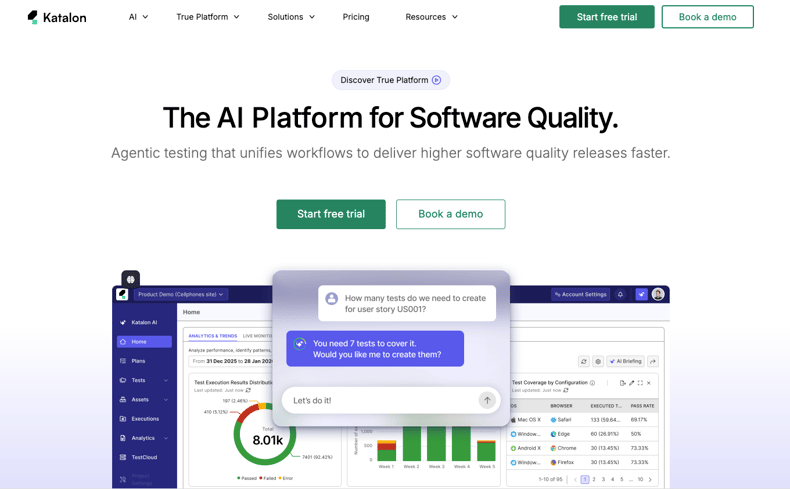
Katalon True Platform is a complete quality management platform that unifies automation, execution, test management, and production insights across all application types - web, API, mobile, and desktop. It's designed to support both hands-on engineers and broader team contributors, with flexible test creation paths and AI built into the workflow, not bolted on top.
-
Test creation: low-code to full-code: Build tests faster using Katalon's built-in keyword library with drag-and-drop capabilities, or switch to Java/Groovy scripting for advanced customization. Teams can start with minimal programming effort and scale to full scripting as needed - no trade-off required.
-
Data-driven testing: Import test data from Excel, CSV, or XML. Capture data snapshots and use Global Variables to support different environments and development stages, keeping test coverage consistent across your entire release cycle.
-
Test artifact management: A centralized object repository stores all UI elements, objects, and locators. When UI changes occur, locators can be updated across multiple test cases in just a few clicks - reducing the maintenance burden that typically follows any front-end redesign.
-
Production insights: True Production Insights (TrueTest) connects production telemetry to your test results, so your team can see which failures and defects actually affect real users, not just what breaks in CI.
AI capabilities powered by the Katalon AI Assistant
Katalon True Platform includes the Katalon AI Assistant, which operates across the entire testing lifecycle through six specialized agents, under an “AI proposes, human approves” model rather than running unsupervised:
- Requirement Analyzer: Analyzes and validates requirements before a single test is written, identifying ambiguities, flagging gaps, and defining a testing plan so your team starts from a solid foundation.
- Test Generation Agent: Automatically generates the minimum set of test cases needed to cover a requirement, from Jira or Azure DevOps tickets or uploaded documents (PDF, DOCX, XLSX, or image). Cases link back to the source requirement in your ALM.
- Autonomous Test Runner: Executes manual test cases in the background on a real browser, no scripting required, capturing a screenshot at every step and a full video with clickable timestamps. In AI mode, it auto-selects high- and medium-confidence tests and supports parallel runs.
- Bug Reporter: Identifies failures and automatically composes structured defect tickets from test results (error messages, failed steps, screenshots), then files them to Jira or Azure DevOps. Every ticket goes through a human review checkpoint before submission.
- Root Cause Analyzer: Pinpoints the root cause of each test failure, classifying it as a script issue, application bug, or environment problem, and tracks suite-level stability trends so teams know what to fix first.
- Report & Insight Generator: Answers plain-language questions about coverage, defect trends, and release readiness from live platform data, and delivers a GO/NO-GO recommendation against configured thresholds when you need one.

|
