


.svg)

What device should you run your tests on? Which operating system version, manufacturer, and model? And how do you actually get your hands on all of them? These are some of the first questions any team runs into when planning a mobile testing strategy, and once you start thinking about automating those tests, the list only gets longer.
Automating tests for mobile devices, whether for native apps or responsive web apps, comes with technical and non-technical challenges that mostly trace back to one thing: the devices and platforms the tests actually run on. That's why an integrated testing platform matters here. It's not enough to automate the test logic, you also need a reliable way to run that logic across a realistic spread of devices without turning device management into its own full-time job.
THE SHORT ANSWER
How Katalon TestCloud fits into mobile test automation, at a glance:
• Runs automated and manual mobile tests on real Android and iOS devices and real browsers, not emulators, when a cloud session is available
• Katalon Studio test suites can target TestCloud directly, with an active subscription or trial and an available session
• Supports live manual testing, the Smart Mobile Recorder, and Mobile Visual Testing on supported cloud devices
• Where configured, execution data can feed TestOps for test management and reporting, and supported AI-assisted triage and summaries
• Exact device conditions, integrations, and export options vary by subscription, device and OS, and how a session is configured
The sections below cover what's currently supported and how it compares to running your own device lab or a separate cloud execution vendor.
The challenge of fragmentation and access to devices
New mobile devices reach the market constantly, each with its own OS version, manufacturer quirks, screen size, and resolution. Since end users test your app on exactly these devices, whether you plan for it or not, they're also the devices your test suite needs to cover.
That raises a practical set of questions. How do you make sure your app runs smoothly across that range of hardware? How do you get access to it in the first place, and how long does provisioning and configuring each device actually take? What happens to those devices once testing wraps, and what does buying and maintaining them cost in the meantime? None of these are hypothetical, they're the real budget and logistics line items behind any mobile testing strategy.
A few alternatives
Real devices vs. emulators
One option is to skip physical devices altogether and test against emulators, configuring what you need for a given run and discarding it afterward. On paper, that avoids the cost of buying real hardware and simplifies setup.
The tradeoff is real, though. An emulator is software pretending to be a device, not the device itself, so there's always a chance your app behaves differently on an emulator than it would on the hardware your users actually carry.
📚 Read more: Mobile Emulator vs. Simulator vs. Real Device Testing Differences.
The power of the cloud
Cloud-based real device platforms address most of the questions above at once. They're real hardware, not emulated, which is more representative of how your app actually behaves than an emulator, though how much coverage that gives you still depends on which devices are in the matrix, the test data you use, and how each session is configured. You get a spread of manufacturers, OS versions, and screen resolutions without buying a single unit, and there's nothing to dispose of once testing ends.
Katalon TestCloud, built into True Platform
What is TestCloud?
Katalon TestCloud is the execution capability built into Katalon's True Platform, the part of the platform that runs your automated and manual tests on real browsers, operating systems, and mobile devices in the cloud. It works alongside Katalon Studio, where tests are authored, and TestOps, where runs are scheduled, tracked, and reported on.
Katalon Studio test suites can target TestCloud's cloud devices directly, but that requires an active True Platform subscription or trial with an available session. Installing Studio on its own doesn't unlock cloud devices.
What does it offer?
Katalon TestCloud lets you:
- Run automated tests on real Android and iOS phones and tablets, subject to which devices and OS or API versions are included in your subscription
- Test native apps and mobile web through the supported mobile browsers, Chrome on Android and Safari on iOS, per the supported-environment matrix
- Select devices directly inside the platform from the sessions available under your plan, rather than coordinating access or maintenance yourself
- Run parallel, independent tests across available sessions, including recurring scheduled runs
- Capture downloadable screenshots and video and review results per device for tracking and incident management; current True Platform downloads include CSV, XLSX, PDF, and ZIP formats
Recording, visual checks, and live interaction
On supported cloud devices, the Smart Mobile Recorder can capture, replay, and refine Android and iOS actions and objects, which cuts down on writing every step by hand against real hardware. Mobile Visual Testing lets you set checkpoints and compare runs against an approved baseline to catch visual regressions. Live Interaction lets a tester add supported human input to a session that's already running automated, useful for the parts of a flow that still need a person to judge, such as a payment confirmation or a biometric prompt.
Testing real-world conditions
TestCloud also supports testing under a range of real-world conditions, though what's available depends on your subscription, the specific device, OS and API version, any required plugins, app signing, and how a session is configured. Where supported, this can include simulating biometric prompts, GPS and location scenarios, different network profiles, and camera image injection, as well as controlling app lifecycle events, switching between devices mid-session, working with files and media on the device, and adjusting orientation, language, and time zone.
Testing an application hosted behind a private firewall is also supported, through a Cloud Tunnel connection or IP allowlisting, so pre-release or internal builds don't need to be made publicly reachable first.
How does TestCloud work?
TestCloud is integrated into Katalon's True Platform, where test executions (Test Runs) are managed and the devices they run on (Environments) are assigned. To start, you schedule a Test Run, select the project and test suite, then open the Environment section.

From there, you can select the TestCloud option and choose from the devices available in your session.
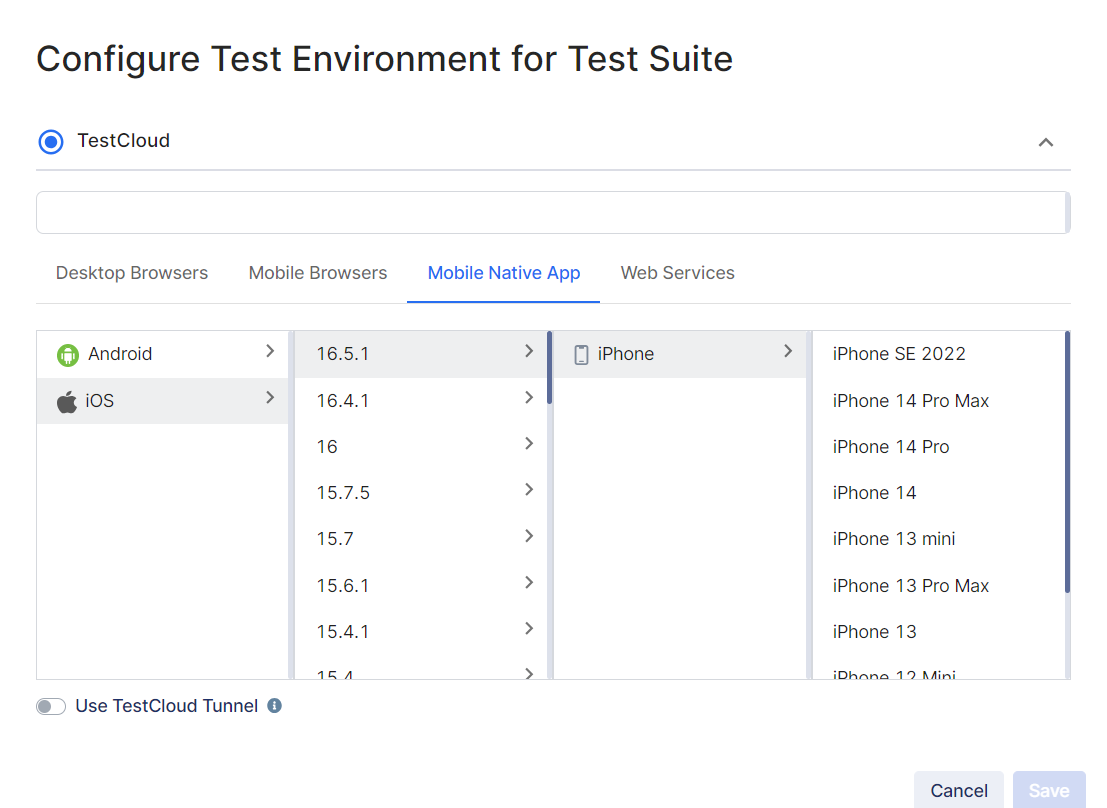
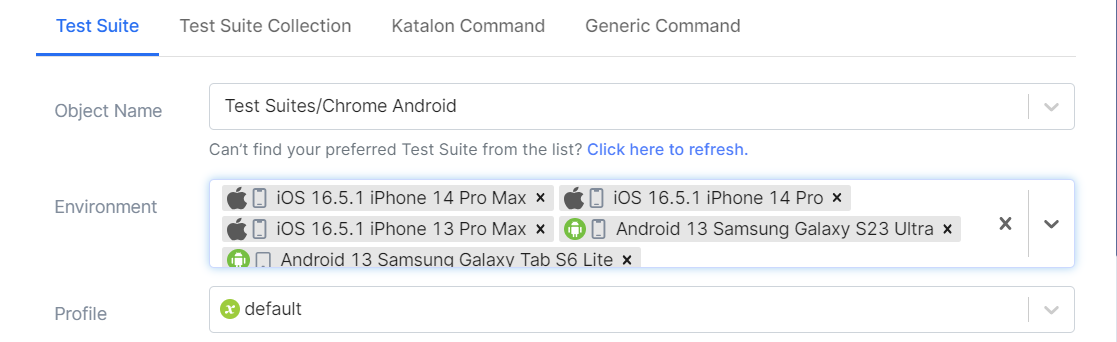
The platform shows details for every available device, and selecting multiple devices lets you run the same test suite across all of them, sequentially or at the same time, within the limits of your available sessions.
Once you confirm the run, TestCloud executes the test suite on each selected device. You can watch the execution log in real time and review results and captured evidence, screenshots and video, per device. Depending on your plan, results can be exported to CSV, XLSX, PDF, or ZIP. Runs can also be triggered from CI/CD tools such as Jenkins and GitHub Actions where that integration is configured for your pipeline, so mobile execution doesn't have to be a manual step someone remembers to run.


Katalon TestCloud vs. other cloud execution options
BrowserStack, Sauce Labs, and LambdaTest are established cloud device platforms, and if your team already has automated tests running on one of them, that's a legitimate starting point. Device catalogs, compliance certifications, pricing models, and analytics differ across vendors and change over time, so they're worth checking directly against each vendor's current documentation rather than relying on a general comparison here.
A few questions are worth asking of any cloud execution option you're evaluating, TestCloud included:
- Which specific devices, OS versions, and browsers are included in your plan or subscription tier
- Whether execution results connect to a test management and reporting system, or stay in a separate dashboard you'd need to integrate yourself
- Which compliance certifications apply, and whether they match your organization's requirements
- How pricing scales with usage, parallel sessions, or device types
For Katalon TestCloud specifically: under an active True Platform subscription, results from a run can feed into TestOps for test management and reporting, and into supported AI-assisted triage and summaries where that's configured. Any AI-generated summary is worth checking against the underlying captured evidence, screenshots, video, and logs, rather than treated as the final word.
Conclusion
Mobile test automation comes with real technical complexity, starting with the sheer number of manufacturers, models, screen resolutions, and OS versions your users are actually running. Emulators are a workable stopgap, but they carry the risk that your app behaves differently on real hardware than it did in the test.
Cloud-based real device testing is generally a more representative alternative to emulators, though the coverage you actually get from it depends on your device matrix, test data, and configuration. Katalon TestCloud, the execution capability built into True Platform, connects that real-device execution to TestOps for test management and reporting, and to supported AI-assisted triage where configured, so your mobile test automation results don't end up scattered across a separate tool.
Katalon Studio is where you build and run those tests. Reaching TestCloud's cloud devices from Studio requires an active subscription or trial with an available session, not just the download itself.
|
