


.svg)


AI testing is the process of evaluating the functionality, performance, and reliability of a system with the help of AI. The goal of AI testing is to significantly improve the efficiency of traditional software testing thanks to AI's exceptional generative powers.
AI, Machine Learning, and Generative AI: Quick Definitions
Before going further, it helps to separate three terms that get used interchangeably, but aren't quite the same thing.
- Artificial intelligence (AI) is the use of technologies to build machines and computers that have the ability to mimic cognitive functions associated with human intelligence.
- Machine learning (ML) is a subset of AI that automatically enables a machine or system to learn and improve from experience. Instead of explicit programming, machine learning uses algorithms to analyze large amounts of data, learn from the insights, and then make informed decisions.
- Generative AI is a further subset of AI/ML: models trained to generate new outputs from patterns in data, rather than following explicit rules. Where a traditional AI testing tool follows programmed logic, generative AI produces new test scenarios and data it wasn't explicitly told to create, based on what it's learned from existing examples.
In practice, most of what this guide calls "AI testing" draws on all three. A self-healing locator is a machine learning problem. A tool that writes a brand-new test case from a plain-language prompt is generative AI at work.
AI testing vs Traditional Software Testing
AI testing is essentially an AI-powered upgrade for traditional software testing. All stages of traditional software testing can benefit by an integration of AI into the process.
Traditionally, software testing follows the Software Testing Life Cycle, which consists of 6 major stages:

AI testing follows the same life cycle. Now that there is AI involved, testers can achieve better results faster. Here are some ideas of how you can incorporate AI into the traditional STLC to turn it into an AI-powered STLC:
- Requirement Analysis: AI analyzes the stakeholder requirements and propose a detailed test strategy
- Test Planning: AI devises a test plan based on the strategy, tailoring it to your organization's needs (such as prioritizing high-risk test cases and areas).
- Test Case Development: AI generates, adapts, and self-heals test scripts. It can also provides synthetic test data.
- Test Cycle Closure: AI analyzes defects, predicts trends, and automates reporting.
Three Ways to Bring AI/ML Into Your Testing
Before picking a use case to start with, it's worth knowing there are generally three approaches to incorporating AI/ML into your testing, and the right one depends on your team's resources and timeline:
- Building your own AI, tailored to the specific needs of your organization. This is the most flexible option, but also the most long-term and resource-intensive.
- Leveraging foundation models via APIs or open models, so you get modern AI capability without training your own system from scratch.
- Using an off-the-shelf tool with built-in AI features for testing, the fastest way to get started since the AI work is already done for you.
Most teams start with the third option and move toward the second as their needs get more specific. Whichever you choose, there are generally five areas an AI/ML system can contribute the most: test creation, test data generation, test execution, test maintenance, and root cause analysis.
Use Case of AI For Testing
According to the State of Software Quality Report 2024:
- AI is most commonly applied for test case generation, both in manual testing (50% respondents agreed) and automation testing (37%).
- Test data generation follows closely, with 36%.
- Test optimization and prioritization is another noted use case, at 27%.

1. AI-powered Test Creation
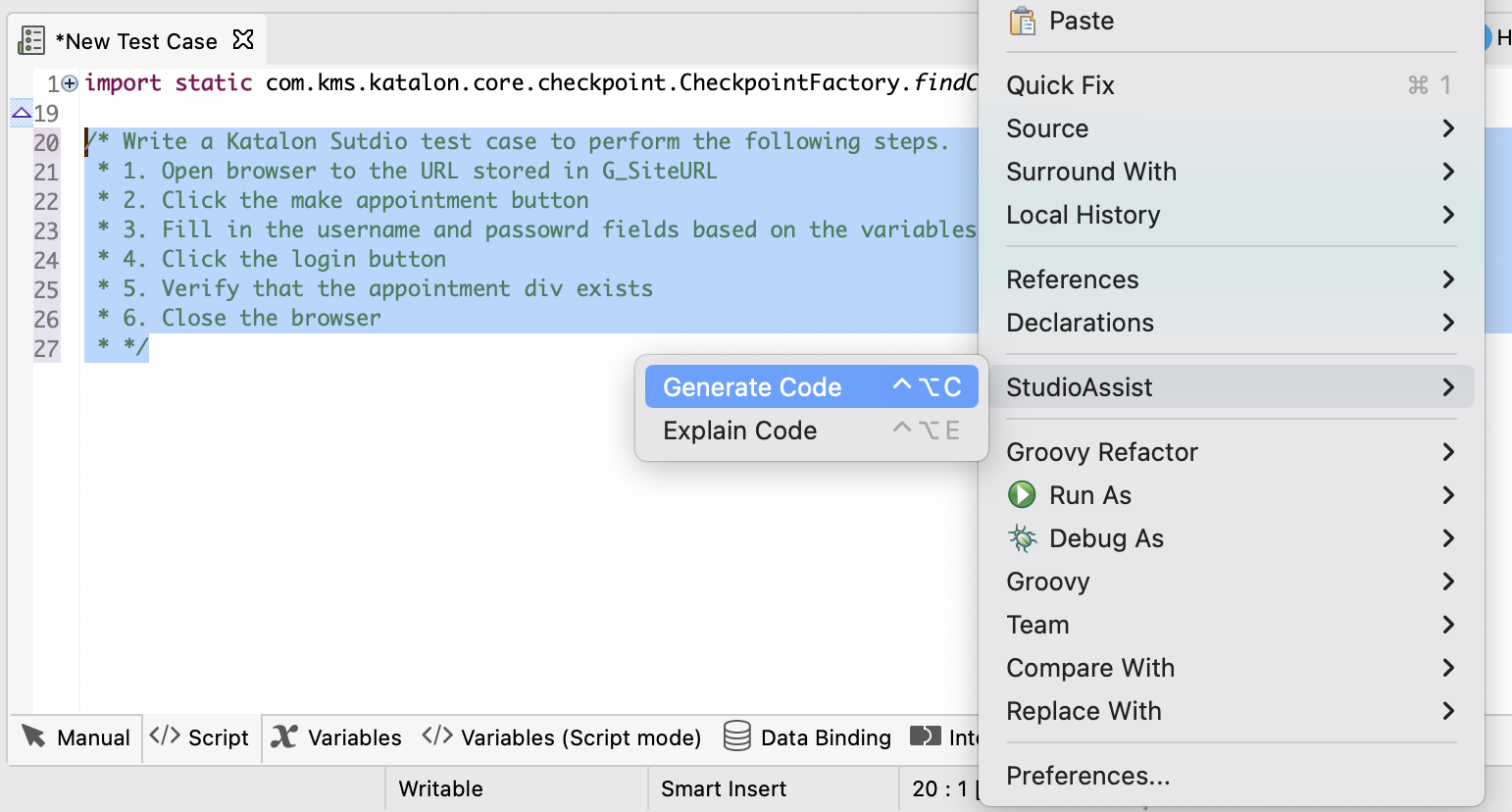
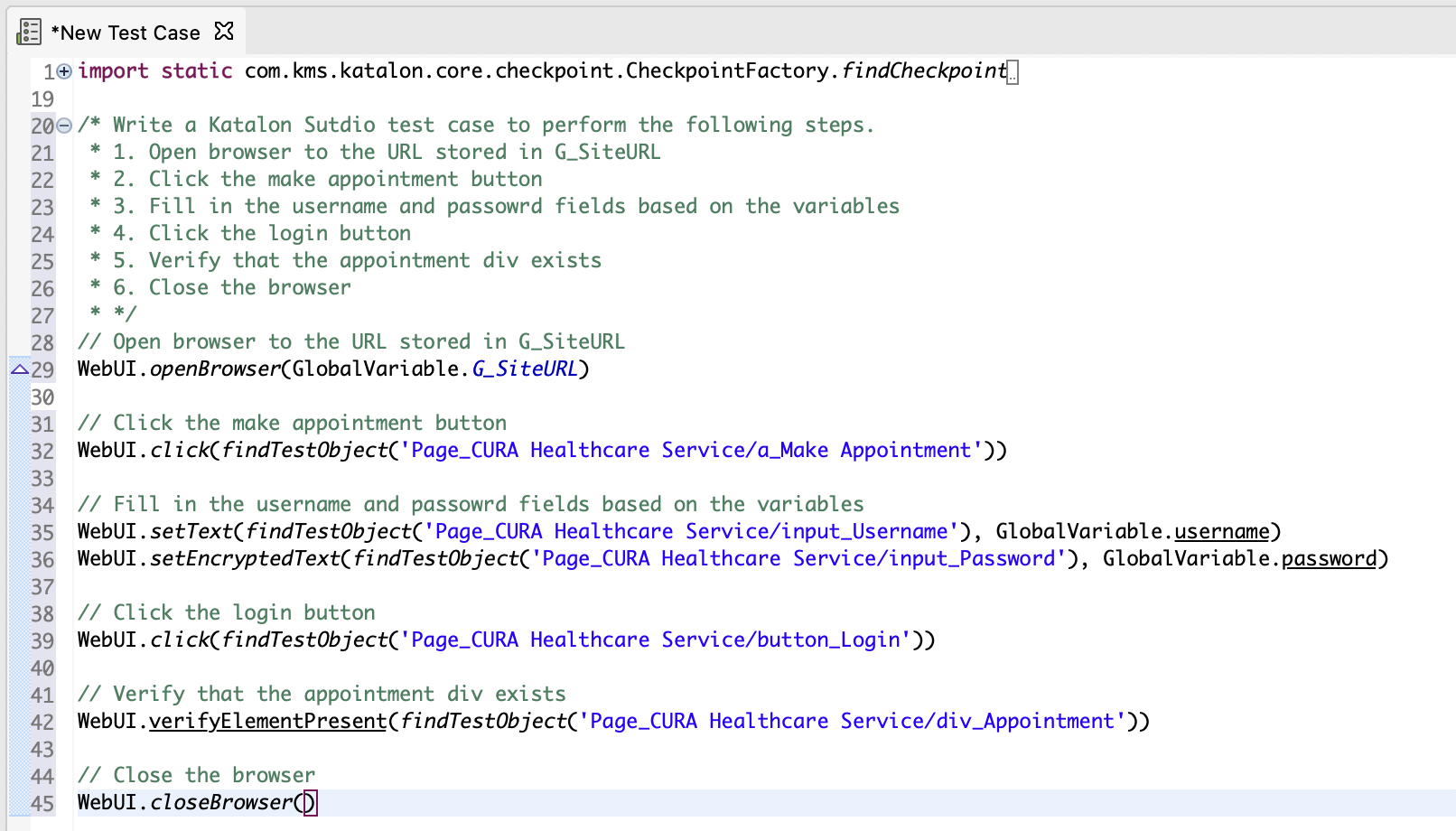
The first use case of AI for testing is test case generation. Here is an example of StudioAssist in Katalon Studio. Testers can use the Generate Code feature to turn set of test steps written in human language into a code snippet:
Once generated, this test case can be easily edited and customized, then executed across a wide range of environments. Here is the end result:
2. Test Case Recommendation
This use case is a good illustration of where machine learning specifically, not just AI in general, does the heavy lifting. Imagine you're running an eCommerce website with thousands of products, different user paths, and constant updates. Covering every possible scenario, even with automation already in place, is a genuine challenge.
This is where machine learning comes in. You feed the system data about how users interact with your website: what products they view, what actions they take, and when they abandon their carts. As it gathers and analyzes this data over time, it starts noticing patterns, recognizing that certain products are frequently viewed together, or that users tend to abandon their carts during a specific step in checkout.
This is exactly what TrueTest from Katalon does. It maps user journeys from real interaction data to identify the scenarios most worth testing, then auto-generates automation test cases for those scenarios, drastically speeding up test creation for the paths that matter most.
3. Automated Test Data Generation
In scenarios where the use of real-world data is not possible due to compliance and regulations, AI-powered synthetic test data generation is especially helpful. It is easy to customize the characteristics of the AI to fit your highly specific testing needs.
For example, here we use Katalon AI to generate a set of synthetic data for testing purpose, then store the results inside an Excel file using Apache ROI:

Read More: Synthetic Test Data Generation With Katalon
To see why this matters at scale, take a global eCommerce site that ships across borders. Shipping fees alone vary by package weight, geographic zone, distance, carrier selection, coupons, and additional charges. Manually building test data that covers every realistic combination of those variables would take days. Tell an AI system what you need instead, down to the specific weight ranges, time zones, and fee types, and it can generate a realistic dataset in minutes.
4. AI-powered Test Maintenance
For web testing and especially UI testing, test maintenance is a real struggle for all testers. UIs change constantly, and hard-coded test cases break easily.
Technically speaking, test scripts identify and interact with web elements (buttons, links, images, etc.) through "locators", a unique ID for each element. When these locators change due to code update, the test scripts no longer recognize the element, leading to a broken test.
With the help of AI, this issue can be fixed. When a test is broken, AI can fetch a new locator to replace the broken ones to continue running the tests. This reduces the tester's maintenance workload.

5. Visual Testing
In the past, human testers had to rely on their eyes to find visual differences between how the UI looked before it was launched and how it appeared after.
The problem arises when we want to automate visual testing, which involves comparing screenshots of the UI before and after launch. Three things make this harder than it sounds:
- The computer recognizes extremely minor, pixel-level visual inconsistencies between screenshots as "visual bugs," even though these don't affect the user experience.
- Different computers and browsers render images differently, so screenshots can be technically different but not visually noticeable to a person.
- Certain UI elements, like a cart icon that updates its count, change all the time by design, and a plain test script doesn't understand that this kind of change is expected, not a bug.
AI can learn which zones should be "ignored" even when changes appear there, and whether the differences between two screenshots are actually meaningful.
6. Generative AI in Software Testing
Everything above is "AI testing" broadly. Generative AI is a specific technique within that broader category, and it's worth calling out on its own because of how it changes test case creation and defect detection.
Where a traditional AI testing tool follows programmed logic, generative AI models learn from existing code, specifications, and requirements, then produce new test scenarios and data they weren't explicitly told to create. Two examples from outside the testing tool space show how this plays out: Facebook's Infer, a static analyzer for mobile applications, uses generative techniques to identify complex coding issues and vulnerabilities. Google DeepMind has used generative AI models to optimize the testing process for its own machine learning systems.
Beyond test cases and defect detection, generative AI is also increasingly used for design prototyping: analyzing existing design patterns and user feedback to propose new UI alternatives and speed up design iteration, an adjacent but genuinely useful application for teams that own both design and QA quality.
Benefits of AI Testing
- Faster test execution
- Reduced manual effort
- Improved test coverage
- Self-healing automation
- Early defect detection
- Smarter test case generation
- Enhanced accuracy and reliability
- Predictive defect analytics
- Cost savings in long-term testing
- Continuous testing in CI/CD pipelines
Challenges of AI Testing
- Data dependency: AI models are only as effective as the data behind them, so limited or low-quality data directly caps how useful they can be.
- Limited explainability: Some AI-driven decisions are hard to trace back to a clear reason, which makes them harder to trust or debug.
- Human judgment still required: AI isn't a full replacement for testers; exploratory testing, usability judgment, and business context still need a person.
- Setup complexity: Getting an AI testing tool properly configured and trained takes real upfront time and effort.
- Bias risk: Models trained on skewed or unrepresentative data can produce biased or unfair results.
- Ongoing maintenance: AI models need continuous learning and regular updates to stay accurate as your application and data change.
- Training data quality: AI/ML models need large, diverse datasets to be effective. Early on, recommendations may not be well-tailored to your organization's specific needs, though they improve as the system learns your patterns.
- Overfitting and underfitting: overfitting happens when a model is too closely tied to its training data and doesn't generalize well; underfitting happens when the model is too simple to capture real patterns.
- Model drift: AI models can become less effective over time as the software or its usage changes. This requires ongoing monitoring rather than a one-time setup.
Responsible and Ethical AI in Testing
As AI takes on more of the testing process, it's worth being deliberate about a few things that are easy to overlook when you're focused on speed:
- Bias and fairness: generative and predictive models learn from historical data, which can introduce bias if that data reflects existing imbalances. Curate training data carefully and evaluate the fairness of AI-generated outputs.
- Privacy and data protection: AI systems often analyze large datasets that may contain sensitive information. Strict privacy compliance, informed consent, and solid security practices matter here just as much as they do anywhere else in your stack.
- Transparency and explainability: deep-learning-based models can be genuinely hard to interpret. Being able to explain how an AI system reached a given output is what makes the result trustworthy to the rest of the team, not just fast.
- Accountability and liability: when AI-driven decisions affect users or lead to an undesired outcome, someone still needs to own that outcome. Clear accountability frameworks matter more, not less, as AI takes on a bigger share of the testing process.
Responsible AI use isn't a separate initiative bolted onto testing: it's continuous monitoring, validation, and human oversight built into how the AI is used day to day.
Is AI Going To Replace Testers?
It's an age-old question: will AI testing replace traditional software testers?
AI is indeed disruptive, and similar to many disruptive inventions in the past, it always create a sense of uncertainty and skepticism among its adopters.
AI technology is only in its infancy, but at the current rate this tech is growing, it is undeniable that it will affect the lives of so many people, including software testers.
What testers need to do is adapt instead of panic. The most significant shift ahead is the move from AI-assisted testing, where AI handles isolated tasks like generating test cases or identifying duplicates, to agentic QA, where autonomous AI agents manage the full testing lifecycle from requirements analysis through execution and maintenance.
📚 Read more: Will AI Replace Manual Testers? Katalon's Data Says the Story Is More Complicated
💡 For a practitioner's view on where that line is, see our conversation with Huy Tieu, Katalon Senior PM and the person behind Katalon Scout, on why the scripted model breaks under AI-native dev velocity and what the harness-first approach looks like in practice.
A good way to think about it is to remember what AI can and can't do:
What AI Can Do:
- Automate regression, functional, and load testing.
- Identify patterns, anomalies, and defects faster than humans.
- Optimize test case selection and execution based on risk analysis.
- Self-heal test scripts to reduce maintenance effort.
What AI Can't Do:
- Perform exploratory and usability testing, which require human intuition.
- Assess user experience, accessibility, and emotional responses.
- Make ethical decisions when evaluating bias and fairness in software.
- Understand business logic, edge cases, and subjective requirements beyond historical data.
In fact, in the age of AI, human ingenuity and creativity is more needed than ever. What testers need to do is:
- Learn AI-powered testing tools and frameworks.
- Shift towards test strategy, analysis, and automation oversight.
- Develop skills in AI ethics, interpretability, and human-AI collaboration.
- Adapt to a hybrid model, where AI handles repetitive tasks, and humans focus on critical thinking and decision-making.
Best Practices For AI Testing
- Monitor AI Model Behavior – Continuously track performance to detect drift or unexpected changes.
- Test for Bias & Fairness – Identify and eliminate biases in AI models to ensure ethical outcomes.
- Perform Robustness Testing – Validate AI's ability to handle edge cases and adversarial inputs.
- Ensure Explainability – Use techniques to make AI decisions transparent and interpretable.
- Learn Prompt Engineering – Well-structured, precise prompts are what separate a useful AI output from a vague one, especially when working with generative AI.
- Continuously Improve – Update tests as AI models evolve, ensuring long-term accuracy and reliability.
Testing For AI Systems
The "AI testing" term can also be understood as testing for AI-based systems, or "testing for AI". To process a tremendous amount of data to recognize patterns and make intelligent decisions, these AI systems incorporate many AI techniques, including:
- Machine learning
- Natural language processing (NLP)
- Computer vision
- Deep learning
- Expert systems
Testing with AI (using AI models to supercharge your testing) and testing for AI systems (validating that those models themselves perform as expected) are two different jobs, and the second one is meaningfully harder:
- AI/ML models can be highly complex, involving intricate mathematical algorithms that are hard to reason about from the outside.
- There are close to infinite possible outputs an AI system can generate, so testing "all of them" is not a realistic goal the way it might be for a deterministic feature.
- AI/ML applications are often "black boxes": their internal workings are complex and hard to interpret, which makes it difficult to determine what inputs are even meaningful to test.
- AI/ML models can be vulnerable to adversarial inputs, carefully crafted inputs designed to exploit a weakness, that traditional coverage criteria won't catch.
- AI/ML models adapt and "learn" from new data, so their behavior evolves over time, and the test cases written for them need to evolve right alongside.
AI-Powered Tools for AI Testing
The following software testing tools pioneer the AI testing trend and incorporate AI technologies into their systems to bring software testing to the next level. More than simply a tool to create and automate testing, they also perform intelligent tasks that in the past would have required a human tester.
1. Katalon Studio

Katalon Studio is a comprehensive quality management platform that supports test creation, management, execution, maintenance, and reporting for web, API, and mobile applications across a wide variety of environments, all in one place, with minimal engineering and programming skill requirements.
For AI testing specifically, here are the key features you can have:
- StudioAssist: Leverages ChatGPT to autonomously generate test scripts from a plain language input and quickly explains test scripts for all stakeholders to understand.
- Katalon GPT-powered manual test case generator: Integrates with JIRA, reads the ticket's description, extracts relevant information about software testing requirements, and outputs a set of comprehensive manual test cases tailored to the described test scenario.
- SmartWait: Automatically waits until all necessary elements are present on screen before continuing with the test.
- Self-healing: Automatically fixes broken element locators and uses those new locators in following test runs, reducing maintenance overhead.
- Visual testing: Indicates if a screenshot will be taken during test execution, then assesses the outcomes using Katalon TestOps. AI is used to identify significant alterations in UI layout and text content, minimizing false positive results and focusing on meaningful changes for human users.
- Test failure analysis: Automatically classifies failed test cases based on the underlying cause and suggests appropriate actions.
- Test flakiness: Understands the pattern of status changes from a test execution history and calculates the test's flakiness.
- Image locator for web and mobile app tests: Finds UI elements based on their visual appearance instead of relying on object attributes.
- Web service anomalies detection (TestOps): Identifies APIs with abnormal performance.
As one of the pioneers in the AI testing world, Katalon continues to add more exciting AI-powered features to their product portfolio, empowering QA teams around the world to test with unparalleled accuracy and efficiency.
2. TestCraft

TestCraft simplifies regression testing and web monitoring using AI and Selenium, reducing maintenance time and costs.
Key Features:
- No coding required – Drag-and-drop interface for easy test creation.
- Cross-browser testing – Run tests on multiple environments simultaneously.
- On-the-Fly mode – Automatically generates test models for easy reuse.
- AI-powered element detection – Identifies web elements even with UI changes.
- Adaptive testing – Adjusts to dynamic changes, minimizing test breakages.
3. Applitools

Applitools is a software that manages visual applications and employs visual AI for AI-powered visual UI testing and monitoring. The incorporated AI and machine learning algorithms are fully adaptive, enabling it to scan and analyze app screens like the human eye and brain, but with the capabilities of a machine.
Key features:
- It effectively identifies visual bugs in apps, ensuring that no visual elements overlap, remain invisible, go off-page, or introduce unexpected features. Traditional functional tests fall short in achieving these objectives.
- Applitools Eyes accurately detects material differences and distinguishes between relevant and irrelevant ones.
- Automation suites sync with rapid application changes.
- Cross-browser testing is supported, but with limited AI features.
4. Testim Automate

Testim Automate uses machine learning to speed up test creation and reduce test maintenance.
- Easy Test Creation: Non-coders can create end-to-end tests with its recording feature, while engineers can extend tests using code.
- Smart Locators for Maintenance: AI assigns weights to multiple attributes of each element, ensuring tests remain stable even when elements change.
- Fewer Test Failures: No need for complex queries. Testim adapts automatically to UI changes, minimizing test breakage.
Where AI Testing Is Headed
AI testing is still early, but it's already solving long-standing challenges in traditional automation. As the technology matures, expect it to take on a wider range of tasks:
- Exploratory testing: automating the free-form exploration that today still depends heavily on a human tester's instincts, helping surface unexpected and undocumented bugs.
- Visual testing: extending the pattern-recognition work described earlier to catch appearance issues automatically, at a scale manual review can't match.
- Test prioritization: identifying which test cases are most likely to find real bugs, so testing effort concentrates on the areas that matter most instead of spreading evenly across everything.
- Test maintenance: keeping large test suites up to date automatically as the underlying software changes, rather than relying on someone noticing a suite has gone stale.
Testers who build fluency with these tools now will be the ones setting the standard once they become the default rather than the differentiator.
|
